DataX 是阿里开源的一个异构数据源离线同步工具,致力于实现包括关系型数据库(MySQL、Oracle等)、HDFS、Hive、ODPS、HBase、FTP等各种异构数据源之间稳定高效的数据同步功能。
DataX Web是在DataX之上开发的分布式数据同步工具,提供简单易用的 操作界面,降低用户使用DataX的学习成本,缩短任务配置时间,避免配置过程中出错。用户可通过页面选择数据源即可创建数据同步任务,支持RDBMS、Hive、HBase、ClickHouse、MongoDB等数据源,RDBMS数据源可批量创建数据同步任务,支持实时查看数据同步进度及日志并提供终止同步功能,集成并二次开发xxl-job可根据时间、自增主键增量同步数据。
但DataX Web很久没更新了,真是可惜!
本文只是一个step by step安装文档,后续使用过程有机会再分项
一、安装DataX
1、安装java
下载jdk解压到/usr/local/java/
[root@localhost local]# mkdir java
[root@localhost ~]# tar  -zxvf /root/jdk-8u261-linux-x64.tar.gz -C /usr/local/java/

[root@localhost ~]# vi /etc/profile
export JAVA_HOME=/usr/local/java/jdk1.8.0_261
export PATH=$JAVA_HOME/bin:$PATH
export CLAsspATH=.:$JAVA_HOME/lib/dt.jar:$JAVA_HOME/lib/tools.jar
export CANAL_SERVER_HOME=/usr/local/canal/deployer
export PATH=$CANAL_SERVER_HOME/bin:$PATH


[root@localhost ~]# source /etc/profile
[root@localhost ~]# java -version
java version "1.8.0_261"
Java(TM) SE Runtime Environment (build 1.8.0_261-b12)
Java HotSpot(TM) 64-Bit Server VM (build 25.261-b12, mixed mode)
2、下载datax
可能遭遇wget:command Not found的情况
[root@localhost ~]# wget http://datax-opensource.oss-cn-hangzhou.aliyuncs.com/datax.tar.gz
-bash: wget: command not found

[root@localhost ~]# yum install -y wget
Loaded plugins: fastestmirror
Determining fastest mirrors
 * base: mirrors.ustc.edu.cn
 * extras: mirrors.ustc.edu.cn
 * updates: mirrors.ustc.edu.cn
base                                                         | 3.6 kB  00:00:00
extras                                                       | 2.9 kB  00:00:00
updates                                                      | 2.9 kB  00:00:00
(1/3): extras/7/x86_64/primary_db                            | 249 kB  00:00:01
(2/3): base/7/x86_64/primary_db                              | 6.1 MB  00:00:16
(3/3): updates/7/x86_64/primary_db                           |  20 MB  00:00:55
Resolving Dependencies
--> Running transaction check
---> Package wget.x86_64 0:1.14-18.el7_6.1 will be installed
--> Finished Dependency Resolution

Dependencies Resolved

====================================================================================
 Package         Arch              Version                    Repository       Size
====================================================================================
Installing:
 wget            x86_64            1.14-18.el7_6.1            base            547 k

Transaction Summary
====================================================================================
Install  1 Package

Total download size: 547 k
Installed size: 2.0 M
Downloading packages:
wget-1.14-18.el7_6.1.x86_64.rpm                              | 547 kB  00:00:00
Running transaction check
Running transaction test
Transaction test succeeded
Running transaction
  Installing : wget-1.14-18.el7_6.1.x86_64                                      1/1
  Verifying  : wget-1.14-18.el7_6.1.x86_64                                      1/1

Installed:
  wget.x86_64 0:1.14-18.el7_6.1

Complete!
[root@localhost ~]# wget http://datax-opensource.oss-cn-hangzhou.aliyuncs.com/datax.tar.gz
--2023-03-13 10:15:04--  http://datax-opensource.oss-cn-hangzhou.aliyuncs.com/datax.tar.gz
Resolving datax-opensource.oss-cn-hangzhou.aliyuncs.com (datax-opensource.oss-cn-hangzhou.aliyuncs.com)... 47.110.177.8
Connecting to datax-opensource.oss-cn-hangzhou.aliyuncs.com (datax-opensource.oss-cn-hangzhou.aliyuncs.com)|47.110.177.8|:80... connected.
HTTP request sent, awaiting response... 200 OK
Length: 853734462 (814M) [application/gzip]
Saving to: ‘datax.tar.gz’

100%[=================================================================================================================>] 853,734,462 2.22MB/s   in 5m 52s

2023-03-13 10:21:01 (2.31 MB/s) - ‘datax.tar.gz’ saved [853734462/853734462]
3、安装python3
[root@localhost ~]# python --version
Python 2.7.5

[root@localhost local]# mkdir python3
[root@localhost local]# tar -xvJf /root/Python-3.9.9.tar.xz  -C /usr/local/python3/
Python-3.9.9/
Python-3.9.9/Python/
...
Python-3.9.9/setup.py

[root@localhost local]# cd /usr/local/python3/
[root@localhost python3]# cd Python-3.9.9/
[root@localhost Python-3.9.9]# ./configure --prefix=/usr/local/python3
checking build system type... x86_64-pc-linux-gnu
checking host system type... x86_64-pc-linux-gnu
...
creating Makefile


If you want a release build with all stable optimizations active (PGO, etc),
please run ./configure --enable-optimizations


[root@localhost Python-3.9.9]# make && make install
gcc -pthread -c -Wno-unused-result -Wsign-compare -DNDEBUG -g -fwrapv -O3 -Wall    -std=c99 -Wextra -Wno-unused-result -Wno-unused-parameter -Wno-missing-field-initializers -Werror=implicit-function-declaration -fvisibility=hidden  -I./Include/internal  -I. -I./Include    -DPy_BUILD_CORE -o Programs/python.o ./Programs/python.c
gcc -pthread -c -Wno-unused-result -Wsign-compare -DNDEBUG -g -fwrapv -O3 -Wall    -std=c99 -Wextra -Wno-unused-result -Wno-unused-parameter -Wno-missing-field-initializers -Werror=implicit-function-declaration -fvisibility=hidden  -I./Include/internal  -I. -I./Include    -DPy_BUILD_CORE -o Parser/acceler.o Parser/acceler.c
Traceback (most recent call last):
  File "<frozen zipimport>", line 520, in _get_decompress_func
ModuleNotFoundError: No module named 'zlib'
During handling of the above exception, another exception occurred:
Traceback (most recent call last):
  File "<frozen zipimport>", line 568, in _get_data
  File "<frozen zipimport>", line 523, in _get_decompress_func
zipimport.ZipImportError: can't decompress data; zlib not available
During handling of the above exception, another exception occurred:
...
    raise CalledProcessError(retcode, process.args,
subprocess.CalledProcessError: Command '['/usr/local/python3/Python-3.9.9/python', '-c', '\nimport runpy\nimport sys\nsys.path = [\'/tmp/tmpyno8zwc7/setuptools-58.1.0-py3-none-any.whl\', \'/tmp/tmpyno8zwc7/pip-21.2.4-py3-none-any.whl\'] + sys.path\nsys.argv[1:] = [\'install\', \'--no-cache-dir\', \'--no-index\', \'--find-links\', \'/tmp/tmpyno8zwc7\', \'--root\', \'/\', \'--upgrade\', \'setuptools\', \'pip\']\nrunpy.run_module("pip", run_name="__main__", alter_sys=True)\n']' returned non-zero exit status 1.

[root@localhost Python-3.9.9]# yum install gcc -y
[root@localhost Python-3.9.9]# yum -y install zlib-devel bzip2-devel openssl-devel ncurses-devel sqlite-devel readline-devel tk-devel gdbm-devel db4-devel libpcap-devel xz-devel
[root@localhost Python-3.9.9]# yum install zlib zlib-devel openssl -y
[root@localhost Python-3.9.9]# yum install openssl-devel -y
[root@localhost Python-3.9.9]# yum install libffi-devel -y

[root@localhost Python-3.9.9]# ./configure --prefix=/usr/local/python3
checking build system type... x86_64-pc-linux-gnu
checking host system type... x86_64-pc-linux-gnu
...
creating Makefile


If you want a release build with all stable optimizations active (PGO, etc),
please run ./configure --enable-optimizations


[root@localhost Python-3.9.9]# make && make install
Successfully installed pip-21.2.4 setuptools-58.1.0
WARNING: Running pip as the 'root' user can result in broken permissions and conflicting behaviour with the system package manager. It is recommended to use a virtual environment instead: https://pip.pypa.io/warnings/venv

[root@localhost Python-3.9.9]# python3
Python 3.9.9 (main, Mar 13 2023, 11:27:42)
[GCC 4.8.5 20150623 (Red Hat 4.8.5-44)] on linux
Type "help", "copyright", "credits" or "license" for more information.
>>>
[2]+  Stopped                 python3
[root@localhost Python-3.9.9]# pip3 --version
pip 21.2.4 from /usr/local/python3/lib/python3.9/site-packages/pip (python 3.9)
[root@localhost Python-3.9.9]#
4、DataX安装
[root@localhost ~]# tar zxf datax.tar.gz -C /usr/local/
[root@localhost ~]# rm -rf /usr/local/datax/plugin/*/._*
# 下载https://github.com/WeiYe-Jing/datax-web的三个py文件
# datax\datax-web\doc\datax-web\datax-python3\datax.py,dxprof.py,perftrace.py
# 复制到/usr/local/datax/bin目录下
[root@localhost ~]# cp *.py usr/local/datax/bin

[root@localhost bin]# python3 datax.py ../job/job.json

DataX (DATAX-OPENSOURCE-3.0), From Alibaba !
Copyright (C) 2010-2017, Alibaba Group. All Rights Reserved.


2023-03-13 12:15:48.740 [main] INFO  VMInfo - VMInfo# operatingSystem class => sun.management.OperatingSystemImpl
2023-03-13 12:15:48.746 [main] INFO  Engine - the machine info  =>

        osInfo: Oracle Corporation 1.8 25.261-b12
        jvmInfo:        Linux amd64 3.10.0-957.el7.x86_64
        cpu num:        4

        totalPhysicalMemory:    -0.00G
        freePhysicalMemory:     -0.00G
        maxFileDescriptorCount: -1
        currentOpenFileDescriptorCount: -1

        GC Names        [PS MarkSweep, PS Scavenge]

        MEMORY_NAME                    | allocation_size                | init_size
        PS Eden Space                  | 256.00MB                       | 256.00MB
        Code Cache                     | 240.00MB                       | 2.44MB
        Compressed Class Space         | 1,024.00MB                     | 0.00MB
        PS Survivor Space              | 42.50MB                        | 42.50MB
        PS Old Gen                     | 683.00MB                       | 683.00MB
        Metaspace                      | -0.00MB                        | 0.00MB


2023-03-13 12:15:48.761 [main] INFO  Engine -
{
        "content":[
                {
                        "reader":{
                                "name":"streamreader",
                                "parameter":{
                                        "column":[
                                                {
                                                        "type":"string",
                                                        "value":"DataX"
                                                },
                                                {
                                                        "type":"long",
                                                        "value":19890604
                                                },
                                                {
                                                        "type":"date",
                                                        "value":"1989-06-04 00:00:00"
                                                },
                                                {
                                                        "type":"bool",
                                                        "value":true
                                                },
                                                {
                                                        "type":"bytes",
                                                        "value":"test"
                                                }
                                        ],
                                        "sliceRecordCount":100000
                                }
                        },
                        "writer":{
                                "name":"streamwriter",
                                "parameter":{
                                        "encoding":"UTF-8",
                                        "print":false
                                }
                        }
                }
        ],
        "setting":{
                "errorLimit":{
                        "percentage":0.02,
                        "record":0
                },
                "speed":{
                        "byte":10485760
                }
        }
}

2023-03-13 12:15:48.777 [main] WARN  Engine - prioriy set to 0, because NumberFormatException, the value is: null
2023-03-13 12:15:48.779 [main] INFO  PerfTrace - PerfTrace traceId=job_-1, isEnable=false, priority=0
2023-03-13 12:15:48.780 [main] INFO  JobContainer - DataX jobContainer starts job.
2023-03-13 12:15:48.784 [main] INFO  JobContainer - Set jobId = 0
2023-03-13 12:15:48.809 [job-0] INFO  JobContainer - jobContainer starts to do prepare ...
2023-03-13 12:15:48.809 [job-0] INFO  JobContainer - DataX Reader.Job [streamreader] do prepare work .
2023-03-13 12:15:48.810 [job-0] INFO  JobContainer - DataX Writer.Job [streamwriter] do prepare work .
2023-03-13 12:15:48.810 [job-0] INFO  JobContainer - jobContainer starts to do split ...
2023-03-13 12:15:48.811 [job-0] INFO  JobContainer - Job set Max-Byte-Speed to 10485760 bytes.
2023-03-13 12:15:48.811 [job-0] INFO  JobContainer - DataX Reader.Job [streamreader] splits to [1] tasks.
2023-03-13 12:15:48.812 [job-0] INFO  JobContainer - DataX Writer.Job [streamwriter] splits to [1] tasks.
2023-03-13 12:15:48.830 [job-0] INFO  JobContainer - jobContainer starts to do schedule ...
2023-03-13 12:15:48.835 [job-0] INFO  JobContainer - Scheduler starts [1] taskGroups.
2023-03-13 12:15:48.837 [job-0] INFO  JobContainer - Running by standalone Mode.
2023-03-13 12:15:48.849 [taskGroup-0] INFO  TaskGroupContainer - taskGroupId=[0] start [1] channels for [1] tasks.
2023-03-13 12:15:48.857 [taskGroup-0] INFO  Channel - Channel set byte_speed_limit to -1, No bps activated.
2023-03-13 12:15:48.858 [taskGroup-0] INFO  Channel - Channel set record_speed_limit to -1, No tps activated.
2023-03-13 12:15:48.871 [taskGroup-0] INFO  TaskGroupContainer - taskGroup[0] taskId[0] attemptCount[1] is started
2023-03-13 12:15:49.272 [taskGroup-0] INFO  TaskGroupContainer - taskGroup[0] taskId[0] is successed, used[402]ms
2023-03-13 12:15:49.274 [taskGroup-0] INFO  TaskGroupContainer - taskGroup[0] completed it's tasks.
2023-03-13 12:15:58.852 [job-0] INFO  StandAloneJobContainerCommunicator - Total 100000 records, 2600000 bytes | Speed 253.91KB/s, 10000 records/s | Error 0 records, 0 bytes |  All Task WaitWriterTime 0.054s |  All Task WaitReaderTime 0.062s | Percentage 100.00%
2023-03-13 12:15:58.853 [job-0] INFO  AbstractScheduler - Scheduler accomplished all tasks.
2023-03-13 12:15:58.854 [job-0] INFO  JobContainer - DataX Writer.Job [streamwriter] do post work.
2023-03-13 12:15:58.855 [job-0] INFO  JobContainer - DataX Reader.Job [streamreader] do post work.
2023-03-13 12:15:58.855 [job-0] INFO  JobContainer - DataX jobId [0] completed successfully.
2023-03-13 12:15:58.857 [job-0] INFO  HookInvoker - No hook invoked, because base dir not exists or is a file: usr/local/datax/hook
2023-03-13 12:15:58.859 [job-0] INFO  JobContainer -
         [total cpu info] =>
                averageCpu                     | maxDeltaCpu                    | minDeltaCpu
                -1.00%                         | -1.00%                         | -1.00%


         [total gc info] =>
                 NAME                 | totalGCCount       | maxDeltaGCCount    | minDeltaGCCount    | totalGCTime        | maxDeltaGCTime     | minDeltaGCTime
                 PS MarkSweep         | 0                  | 0                  | 0                  | 0.000s             | 0.000s             | 0.000s
                 PS Scavenge          | 0                  | 0                  | 0                  | 0.000s             | 0.000s             | 0.000s

2023-03-13 12:15:58.859 [job-0] INFO  JobContainer - PerfTrace not enable!
2023-03-13 12:15:58.860 [job-0] INFO  StandAloneJobContainerCommunicator - Total 100000 records, 2600000 bytes | Speed 253.91KB/s, 10000 records/s | Error 0 records, 0 bytes |  All Task WaitWriterTime 0.054s |  All Task WaitReaderTime 0.062s | Percentage 100.00%
2023-03-13 12:15:58.861 [job-0] INFO  JobContainer -
任务启动时刻                    : 2023-03-13 12:15:48
任务结束时刻                    : 2023-03-13 12:15:58
任务总计耗时                    :                 10s
任务平均流量                    :          253.91KB/s
记录写入速度                    :          10000rec/s
读出记录总数                    :              100000
读写失败总数                    :                   0
5、生成数据导入导出模板,并修改后执行
[root@localhost bin]# python3 datax.py -r mysqlreader  -w  postgresqlwriter > myjob.json


[root@localhost bin]# vi myjob.json
{
    "job": {
        "content": [
            {
                "reader": {
                    "name": "mysqlreader",
                    "parameter": {
                        "column": ["id","name"],
                        "connection": [
                            {
                                "jdbcUrl":["jdbc:mysql://*.*.*.*:3306/testdb?characterEncoding=utf8"],
                                "table": ["aaa"]
                            }
                        ],
                        "password": "xxxxxx",
                        "username": "root",
                        "where": ""
                    }
                },
                "writer": {
                    "name": "postgresqlwriter",
                    "parameter": {
                        "column": ["id","name"],
                        "connection": [
                            {
                                "jdbcUrl": "jdbc:postgresql://*.*.*.*:5432/testdb",
                                "table": ["aaa_sync"]
                            }
                        ],
                        "password": "xxxxxx",
                        "postSql": [],
                        "preSql": [],
                        "username": "postgres"
                    }
                }
            }
        ],
        "setting": {
            "speed": {
                "channel": "3"
            }
        }
    }
}

[root@localhost bin]# python3 datax.py myjob.json
...
2023-03-13 12:48:00.222 [job-0] INFO  JobContainer - PerfTrace not enable!
2023-03-13 12:48:00.223 [job-0] INFO  StandAloneJobContainerCommunicator - Total 22 records, 268 bytes | Speed 26B/s, 2 records/s | Error 0 records, 0 bytes |  All Task WaitWriterTime 0.000s |  All Task WaitReaderTime 0.000s | Percentage 100.00%
2023-03-13 12:48:00.224 [job-0] INFO  JobContainer -
任务启动时刻                    : 2023-03-13 12:47:49
任务结束时刻                    : 2023-03-13 12:48:00
任务总计耗时                    :                 10s
任务平均流量                    :               26B/s
记录写入速度                    :              2rec/s
读出记录总数                    :                  22
读写失败总数                    :                   0
6、mysql安装代码示例
[root@localhost ~]# rpm -qa | grep mysql
[root@localhost ~]# rpm -qa | grep -i mariadb
mariadb-libs-5.5.60-1.el7_5.x86_64
[root@localhost ~]# rpm -e --nodeps mariadb-libs-5.5.60-1.el7_5.x86_64
[root@localhost ~]# rpm -qa | grep mysql
[root@localhost ~]# rpm -qa | grep -i mariadb
[root@localhost ~]# rm -rf ./etc/my.cnf
[root@localhost ~]# rm -rf ./etc/lib/mysql


[root@localhost ~]# rpm -qa | grep -i mysql
mysql57-community-release-el7-8.noarch
[root@localhost ~]# yum remove mysql57-community-release-el7-8.noarch
Loaded plugins: fastestmirror
Resolving Dependencies
--> Running transaction check
---> Package mysql57-community-release.noarch 0:el7-8 will be erased
--> Finished Dependency Resolution

Dependencies Resolved

===========================================================================================================================================================
 Package                                           Arch                           Version                          Repository                         Size
===========================================================================================================================================================
Removing:
 mysql57-community-release                         noarch                         el7-8                            installed                         8.2 k

Transaction Summary
===========================================================================================================================================================
Remove  1 Package

Installed size: 8.2 k
Is this ok [y/N]: y
Downloading packages:
Running transaction check
Running transaction test
Transaction test succeeded
Running transaction
Warning: RPMDB altered outside of yum.
** Found 2 pre-existing rpmdb problem(s), 'yum check' output follows:
2:postfix-2.10.1-7.el7.x86_64 has missing requires of libmysqlclient.so.18()(64bit)
2:postfix-2.10.1-7.el7.x86_64 has missing requires of libmysqlclient.so.18(libmysqlclient_18)(64bit)
  Erasing    : mysql57-community-release-el7-8.noarch                                                                                                  1/1
  Verifying  : mysql57-community-release-el7-8.noarch                                                                                                  1/1

Removed:
  mysql57-community-release.noarch 0:el7-8

Complete!
[root@localhost ~]# rpm -qa | grep -i mysql

[root@localhost ~]# yum -y install mysql57-community-release-el7-10.noarch.rpm
Loaded plugins: fastestmirror
Examining mysql57-community-release-el7-10.noarch.rpm: mysql57-community-release-el7-10.noarch
Marking mysql57-community-release-el7-10.noarch.rpm to be installed
Resolving Dependencies
--> Running transaction check
---> Package mysql57-community-release.noarch 0:el7-10 will be installed
--> Finished Dependency Resolution

Dependencies Resolved

===========================================================================================================================================================
 Package                                   Arch                   Version                   Repository                                                Size
===========================================================================================================================================================
Installing:
 mysql57-community-release                 noarch                 el7-10                    /mysql57-community-release-el7-10.noarch                  30 k

Transaction Summary
===========================================================================================================================================================
Install  1 Package

Total size: 30 k
Installed size: 30 k
Downloading packages:
Running transaction check
Running transaction test
Transaction test succeeded
Running transaction
  Installing : mysql57-community-release-el7-10.noarch                                                                                                 1/1
  Verifying  : mysql57-community-release-el7-10.noarch                                                                                                 1/1

Installed:
  mysql57-community-release.noarch 0:el7-10

Complete!
[root@localhost ~]# yum -y install mysql-community-server
Loaded plugins: fastestmirror
Loading mirror speeds from cached hostfile
 * base: mirrors.ustc.edu.cn
 * extras: mirrors.ustc.edu.cn
 * updates: mirrors.ustc.edu.cn
Resolving Dependencies
--> Running transaction check
---> Package mysql-community-server.x86_64 0:5.7.41-1.el7 will be installed
--> Processing Dependency: mysql-community-common(x86-64) = 5.7.41-1.el7 for package: mysql-community-server-5.7.41-1.el7.x86_64
--> Processing Dependency: mysql-community-client(x86-64) >= 5.7.9 for package: mysql-community-server-5.7.41-1.el7.x86_64
--> Processing Dependency: libaio.so.1(LIBAIO_0.1)(64bit) for package: mysql-community-server-5.7.41-1.el7.x86_64
--> Processing Dependency: libaio.so.1(LIBAIO_0.4)(64bit) for package: mysql-community-server-5.7.41-1.el7.x86_64
--> Processing Dependency: libaio.so.1()(64bit) for package: mysql-community-server-5.7.41-1.el7.x86_64
--> Running transaction check
---> Package libaio.x86_64 0:0.3.109-13.el7 will be installed
---> Package mysql-community-client.x86_64 0:5.7.41-1.el7 will be installed
--> Processing Dependency: mysql-community-libs(x86-64) >= 5.7.9 for package: mysql-community-client-5.7.41-1.el7.x86_64
---> Package mysql-community-common.x86_64 0:5.7.41-1.el7 will be installed
--> Running transaction check
---> Package mysql-community-libs.x86_64 0:5.7.41-1.el7 will be installed
--> Finished Dependency Resolution

Dependencies Resolved

===========================================================================================================================================================
 Package                                     Arch                        Version                              Repository                              Size
===========================================================================================================================================================
Installing:
 mysql-community-server                      x86_64                      5.7.41-1.el7                         mysql57-community                      178 M
Installing for dependencies:
 libaio                                      x86_64                      0.3.109-13.el7                       base                                    24 k
 mysql-community-client                      x86_64                      5.7.41-1.el7                         mysql57-community                       28 M
 mysql-community-common                      x86_64                      5.7.41-1.el7                         mysql57-community                      311 k
 mysql-community-libs                        x86_64                      5.7.41-1.el7                         mysql57-community                      2.6 M

Transaction Summary
===========================================================================================================================================================
Install  1 Package (+4 Dependent packages)

Total size: 209 M
Installed size: 895 M
Downloading packages:
Running transaction check
Running transaction test
Transaction test succeeded
Running transaction
  Installing : mysql-community-common-5.7.41-1.el7.x86_64                                                                                              1/5
  Installing : mysql-community-libs-5.7.41-1.el7.x86_64                                                                                                2/5
  Installing : mysql-community-client-5.7.41-1.el7.x86_64                                                                                              3/5
  Installing : libaio-0.3.109-13.el7.x86_64                                                                                                            4/5
  Installing : mysql-community-server-5.7.41-1.el7.x86_64                                                                                              5/5
  Verifying  : mysql-community-server-5.7.41-1.el7.x86_64                                                                                              1/5
  Verifying  : libaio-0.3.109-13.el7.x86_64                                                                                                            2/5
  Verifying  : mysql-community-client-5.7.41-1.el7.x86_64                                                                                              3/5
  Verifying  : mysql-community-common-5.7.41-1.el7.x86_64                                                                                              4/5
  Verifying  : mysql-community-libs-5.7.41-1.el7.x86_64                                                                                                5/5

Installed:
  mysql-community-server.x86_64 0:5.7.41-1.el7

Dependency Installed:
  libaio.x86_64 0:0.3.109-13.el7                    mysql-community-client.x86_64 0:5.7.41-1.el7        mysql-community-common.x86_64 0:5.7.41-1.el7
  mysql-community-libs.x86_64 0:5.7.41-1.el7

Complete!
[root@localhost ~]# systemctl start  mysqld.service
[root@localhost ~]# systemctl status  mysqld.service
● mysqld.service - MySQL Server
   Loaded: loaded (/usr/lib/systemd/system/mysqld.service; enabled; vendor preset: disabled)
   Active: active (running) since Mon 2023-03-13 15:43:21 CST; 10s ago
     Docs: man:mysqld(8)
           http://dev.mysql.com/doc/refman/en/using-systemd.html
  Process: 4620 ExecStart=/usr/sbin/mysqld --daemonize --pid-file=/var/run/mysqld/mysqld.pid $MYSQLD_OPTS (code=exited, status=0/SUCCESS)
  Process: 4565 ExecStartPre=/usr/bin/mysqld_pre_systemd (code=exited, status=0/SUCCESS)
 Main PID: 4623 (mysqld)
   CGroup: /system.slice/mysqld.service
           └─4623 /usr/sbin/mysqld --daemonize --pid-file=/var/run/mysqld/mysqld.pid

Mar 13 15:43:15 localhost.localdomain systemd[1]: Starting MySQL Server...
Mar 13 15:43:21 localhost.localdomain systemd[1]: Started MySQL Server.
二、安装DataX Web
1、安装和配置mysql
[root@localhost ~]# grep "password" /var/log/mysqld.log
2023-03-13T07:43:17.448189Z 1 [Note] A temporary password is generated for root@localhost: RtSqv=uP(0jR
[root@localhost ~]# mysql -uroot -p
Enter password:
Welcome to the MySQL monitor.  Commands end with ; or \g.
Your MySQL connection id is 2
Server version: 5.7.41

Copyright (c) 2000, 2023, Oracle and/or its affiliates.

Oracle is a registered trademark of Oracle Corporation and/or its
affiliates. Other names may be trademarks of their respective
owners.

Type 'help;' or '\h' for help. Type '\c' to clear the current input statement.

mysql> ALTER USER 'root'@'localhost' IDENTIFIED BY 'xxxxxx';
Query OK, 0 rows affected (0.01 sec)

mysql>
[3]+  Stopped                 mysql -uroot -p

[root@localhost ~]# mysql -uroot -p
Enter password:
Welcome to the MySQL monitor.  Commands end with ; or \g.
Your MySQL connection id is 6
Server version: 5.7.41 MySQL Community Server (GPL)

Copyright (c) 2000, 2023, Oracle and/or its affiliates.

Oracle is a registered trademark of Oracle Corporation and/or its
affiliates. Other names may be trademarks of their respective
owners.

Type 'help;' or '\h' for help. Type '\c' to clear the current input statement.


mysql> show database
    -> ;
ERROR 1064 (42000): You have an error in your SQL syntax; check the manual that corresponds to your MySQL server version for the right syntax to use near 'database' at line 1
mysql> show databases;
+--------------------+
| Database           |
+--------------------+
| information_schema |
| mysql              |
| performance_schema |
| sys                |
+--------------------+
4 rows in set (0.00 sec)

mysql> use mysql;
Reading table information for completion of table and column names
You can turn off this feature to get a quicker startup with -A

Database changed
mysql> show tables;
+---------------------------+
| Tables_in_mysql           |
+---------------------------+
| columns_priv              |
| db                        |
| engine_cost               |
| event                     |
| func                      |
| general_log               |
| gtid_executed             |
| help_category             |
| help_keyword              |
| help_relation             |
| help_topic                |
| innodb_index_stats        |
| innodb_table_stats        |
| ndb_binlog_index          |
| plugin                    |
| proc                      |
| procs_priv                |
| proxies_priv              |
| server_cost               |
| servers                   |
| slave_master_info         |
| slave_relay_log_info      |
| slave_worker_info         |
| slow_log                  |
| tables_priv               |
| time_zone                 |
| time_zone_leap_second     |
| time_zone_name            |
| time_zone_transition      |
| time_zone_transition_type |
| user                      |
+---------------------------+
31 rows in set (0.00 sec)

mysql> select Host,User from user;
+-----------+---------------+
| Host      | User          |
+-----------+---------------+
| localhost | mysql.session |
| localhost | mysql.sys     |
| localhost | root          |
+-----------+---------------+
3 rows in set (0.00 sec)

mysql> update user set Host='%' where User='root';
Query OK, 1 row affected (0.00 sec)
Rows matched: 1  Changed: 1  Warnings: 0

mysql> flush privileges;
Query OK, 0 rows affected (0.00 sec)

mysql> create database dataxweb;
Query OK, 1 row affected (0.00 sec)

mysql> show databases;
+--------------------+
| Database           |
+--------------------+
| information_schema |
| dataxweb           |
| mysql              |
| performance_schema |
| sys                |
+--------------------+
5 rows in set (0.00 sec)

mysql>
2、安装datax-web
[root@localhost ~]# cd /usr/local
[root@localhost local]# mkdir dataxweb
[root@localhost ~]# tar -zxvf datax-web-2.1.2.tar.gz -C /usr/local/dataxweb
datax-web-2.1.2/packages/datax-admin_2.1.2_1.tar.gz
datax-web-2.1.2/packages/datax-executor_2.1.2_1.tar.gz
datax-web-2.1.2/bin/
datax-web-2.1.2/bin/db/
datax-web-2.1.2/bin/db/datax_web.sql
datax-web-2.1.2/bin/install.sh
datax-web-2.1.2/bin/start-all.sh
datax-web-2.1.2/bin/start.sh
datax-web-2.1.2/bin/stop-all.sh
datax-web-2.1.2/bin/stop.sh
datax-web-2.1.2/README.md
datax-web-2.1.2/userGuid.md


[root@localhost /]# cd /usr/local/dataxweb/datax-web-2.1.2/bin
[root@localhost bin]# ./install.sh
2023-03-13 15:55:22.429 [INFO] (5272) Creating directory: [/usr/local/dataxweb/datax-web-2.1.2/bin/../modules].
2023-03-13 15:55:22.443 [INFO] (5272)  ####### Start To Uncompress Packages ######
2023-03-13 15:55:22.450 [INFO] (5272) Uncompressing....
Do you want to decompress this package: [datax-admin_2.1.2_1.tar.gz]? (Y/N)y
2023-03-13 15:55:26.696 [INFO] (5272)  Uncompress package: [datax-admin_2.1.2_1.tar.gz] to modules directory
Do you want to decompress this package: [datax-executor_2.1.2_1.tar.gz]? (Y/N)y
2023-03-13 15:55:32.895 [INFO] (5272)  Uncompress package: [datax-executor_2.1.2_1.tar.gz] to modules directory
2023-03-13 15:55:33.390 [INFO] (5272)  ####### Finish To Umcompress Packages ######
Scan modules directory: [/usr/local/dataxweb/datax-web-2.1.2/bin/../modules] to find server under dataxweb
2023-03-13 15:55:33.402 [INFO] (5272)  ####### Start To Install Modules ######
2023-03-13 15:55:33.408 [INFO] (5272) Module servers could be installed:
 [datax-admin]  [datax-executor]
Do you want to confiugre and install [datax-admin]? (Y/N)y
2023-03-13 15:55:36.321 [INFO] (5272)  Install module server: [datax-admin]
Start to make directory
2023-03-13 15:55:36.371 [INFO] (5324)  Start to build directory
2023-03-13 15:55:36.375 [INFO] (5324) Creating directory: [/usr/local/dataxweb/datax-web-2.1.2/modules/datax-admin/bin/../logs].
2023-03-13 15:55:36.467 [INFO] (5324) Directory or file: [/usr/local/dataxweb/datax-web-2.1.2/modules/datax-admin/bin/../conf] has been exist
2023-03-13 15:55:36.474 [INFO] (5324) Creating directory: [/usr/local/dataxweb/datax-web-2.1.2/modules/datax-admin/bin/../data].
end to make directory
Start to initalize database
2023-03-13 15:55:36.570 [INFO] (5324)  Scan out mysql command, so begin to initalize the database
Do you want to initalize database with sql: [/usr/local/dataxweb/datax-web-2.1.2/bin/db/datax_web.sql]? (Y/N)y
Please input the db host(default: 127.0.0.1):
Please input the db port(default: 3306):
Please input the db username(default: root):
Please input the db password(default: ): Ghxt@2023
Please input the db name(default: dataxweb)
mysql: [Warning] Using a password on the command line interface can be insecure.
Do you want to confiugre and install [datax-executor]? (Y/N)y
2023-03-13 15:56:06.729 [INFO] (5272)  Install module server: [datax-executor]
2023-03-13 15:56:06.786 [INFO] (5400)  Start to build directory
2023-03-13 15:56:06.793 [INFO] (5400) Creating directory: [/usr/local/dataxweb/datax-web-2.1.2/modules/datax-executor/bin/../logs].
2023-03-13 15:56:06.885 [INFO] (5400) Directory or file: [/usr/local/dataxweb/datax-web-2.1.2/modules/datax-executor/bin/../conf] has been exist
2023-03-13 15:56:06.892 [INFO] (5400) Creating directory: [/usr/local/dataxweb/datax-web-2.1.2/modules/datax-executor/bin/../data].
2023-03-13 15:56:06.983 [INFO] (5400) Creating directory: [/usr/local/dataxweb/datax-web-2.1.2/modules/datax-executor/bin/../json].
2023-03-13 15:56:07.074 [INFO] (5272)  ####### Finish To Install Modules ######
[root@localhost bin]#
3、查看数据库状态
mysql> use dataxweb
Reading table information for completion of table and column names
You can turn off this feature to get a quicker startup with -A

Database changed
mysql> show tables;
+---------------------+
| Tables_in_dataxweb  |
+---------------------+
| job_group           |
| job_info            |
| job_jdbc_datasource |
| job_lock            |
| job_log             |
| job_log_report      |
| job_logglue         |
| job_permission      |
| job_project         |
| job_registry        |
| job_template        |
| job_user            |
+---------------------+
12 rows in set (0.00 sec)

mysql>
4、修改DataX Web配置文件
[root@localhost bin]# pwd
/usr/local/dataxweb/datax-web-2.1.2/modules/datax-executor/bin
[root@localhost bin]# vi env.properties
# environment variables

#JAVA_HOME=""

SERVICE_LOG_PATH=${BIN}/../logs
# environment variables

#JAVA_HOME=""

SERVICE_LOG_PATH=${BIN}/../logs
SERVICE_CONF_PATH=${BIN}/../conf
DATA_PATH=${BIN}/../data


## datax json文件存放位置
JSON_PATH=${BIN}/../json


## executor_port
EXECUTOR_PORT=9999


## 保持和datax-admin端口一致
DATAX_ADMIN_PORT=

## PYTHON脚本执行位置
PYTHON_PATH=/usr/local/datax/bin/datax.py
#PYTHON_PATH=

## dataxweb 服务端口
SERVER_PORT=9504

#PID_FILE_PATH=${BIN}/service.pid


#debug 远程调试端口
#REMOTE_DEBUG_SWITCH=true
#REMOTE_DEBUG_PORT=7004
"env.properties" 35L, 526C written
5、开启防火墙端口
[root@localhost bin]# firewall-cmd --permanent --zone=public --add-port=9527/tcp --permanent
success
[root@localhost bin]# firewall-cmd --reload
success
[root@localhost bin]# firewall-cmd --permanent --zone=public --add-port=3306/tcp --permanent
success
[root@localhost bin]# firewall-cmd --reload
success
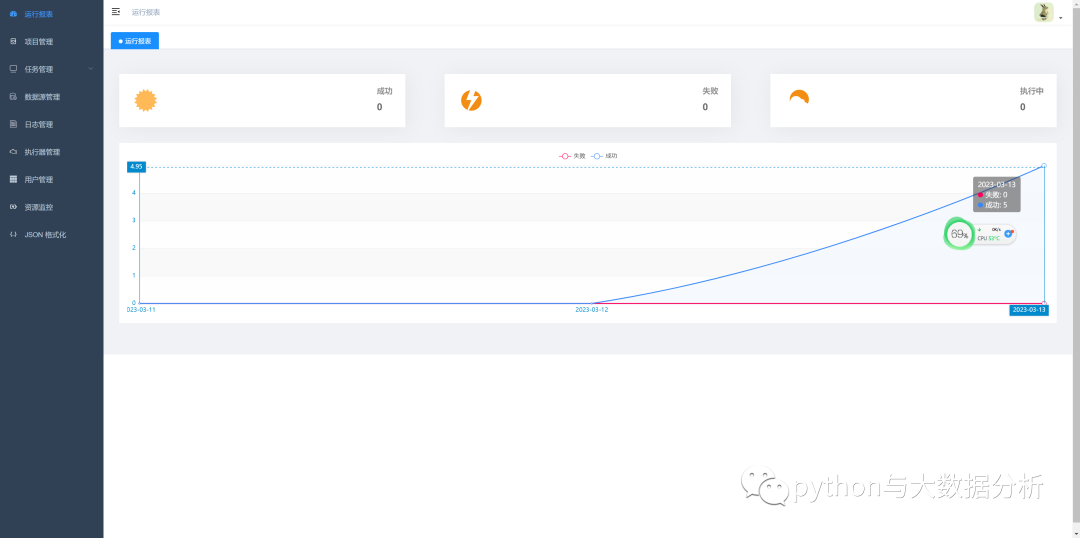
三、最后的成果
欢迎关注公众号:python与大数据分析