



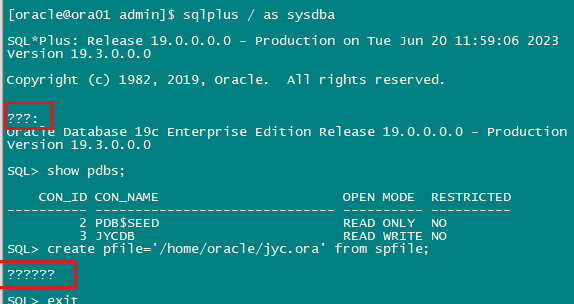
如下问题:oracle在linux环境下连接显示全是问号???
处理办法:
根据select userenv(‘language’) from dual;结果来配置NLS_LANG环境变量即可。
例如:
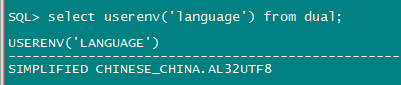
export NLS_LANG="SIMPLIFIED CHINESE_CHINA".AL32UTF8
详细处理过程如下:
[oracle@ora01 ~]$ cat /etc/system-release
Oracle Linux Server release 7.9
[oracle@ora01 ~]$ cat /etc/redhat-release
Red Hat Enterprise Linux Server release 7.9 (Maipo)

[oracle@ora01 ~]$ echo $NLS_LANG

[oracle@ora01 ~]$ sqlplus / as sysdba

SQL*Plus: Release 19.0.0.0.0 - Production on Tue Jun 20 12:02:52 2023
Version 19.3.0.0.0

Copyright (c) 1982, 2019, Oracle.  All rights reserved.


???:
Oracle Database 19c Enterprise Edition Release 19.0.0.0.0 - Production
Version 19.3.0.0.0

SQL> select userenv('language') from dual;

USERENV('LANGUAGE')
----------------------------------------------------
SIMPLIFIED CHINESE_CHINA.AL32UTF8

SQL> exit
? Oracle Database 19c Enterprise Edition Release 19.0.0.0.0 - Production
Version 19.3.0.0.0 ??
[oracle@ora01 ~]$ pwd
/home/oracle
[oracle@ora01 ~]$ vi .bash_profile
# .bash_profile

# Get the aliases and functions
if [ -f ~/.bashrc ]; then
        . ~/.bashrc
fi

# User specific environment and startup programs

PATH=$PATH:$HOME/.local/bin:$HOME/bin

export PATH
export ORACLE_BASE=/u01/app/oracle
export ORACLE_HOME=$ORACLE_BASE/product/19.3.0/db_1
export ORACLE_SID=jyc
export PATH=$ORACLE_HOME/bin:$PATH
export NLS_LANG="SIMPLIFIED CHINESE_CHINA".AL32UTF8
~
".bash_profile" 17L, 389C written
[oracle@ora01 ~]$ source .bash_profile
[oracle@ora01 ~]$ echo $NLS_LANG
SIMPLIFIED CHINESE_CHINA.AL32UTF8
[oracle@ora01 ~]$ sqlplus / as sysdba

SQL*Plus: Release 19.0.0.0.0 - Production on 星期二 6月 20 12:03:52 2023
Version 19.3.0.0.0

Copyright (c) 1982, 2019, Oracle.  All rights reserved.


连接到:
Oracle Database 19c Enterprise Edition Release 19.0.0.0.0 - Production
Version 19.3.0.0.0

SQL> archive log list;
数据库日志模式            存档模式
自动存档             启用
存档终点            USE_DB_RECOVERY_FILE_DEST
最早的联机日志序列     5
下一个存档日志序列   7
当前日志序列           7
SQL>
「喜欢这篇文章,您的关注和赞赏是给作者最好的鼓励」
关注作者
【版权声明】本文为墨天轮用户原创内容,转载时必须标注文章的来源(墨天轮),文章链接,文章作者等基本信息,否则作者和墨天轮有权追究责任。如果您发现墨天轮中有涉嫌抄袭或者侵权的内容,欢迎发送邮件至:contact@modb.pro进行举报,并提供相关证据,一经查实,墨天轮将立刻删除相关内容。
