




作者:杨向博
一、概念简介
Tempfile,即临时文件。大家都熟悉的是当pgsql进程私有buffer不够用时,会将buffer内容dump到tempfile供postgres进程使用。常见的几个功能场景:ExecSorts、ExecHashJoin、ExecMergejoin、tempTable、CTE等,当work_mem或者是temp_buffers不足以容纳sql中间功能环节结果集时会产生tempfile。
这篇博文简单探讨下tempfile的生命周期,何时产生,何时消除,以及对于可能存在的问题的一些思考。
二、原理简析
1.tempfile产生场景
以下图片是从sourceinsight中截取的BufFileWrite函数的所有调用分支,这里并未完全展开调用链。圈起来的函数入口有ExecSort、ExecHashJoin等。
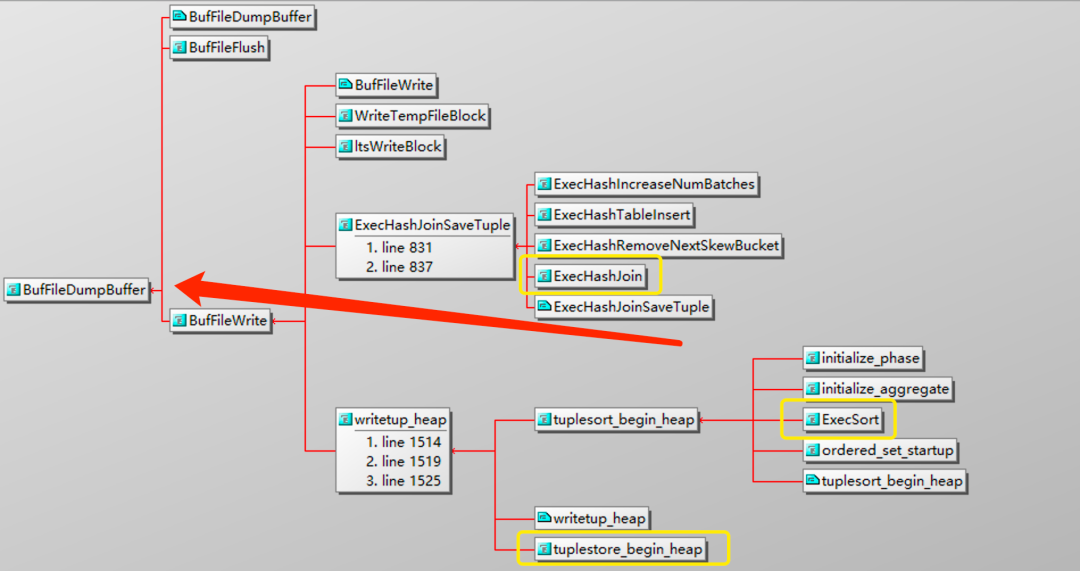
BufFileWrite函数功能是写tempfile,通过调用BufFileDumpBuffer函数,再调入FileWrite函数去写tempfile。
那这里其实有个小点,tempfile一次写多少?总计能写多大?
一般我们会配置temp_file_limit参数来限制单个进程写入量(默认为-1,也就是不限制大小),如果未配置那就是按需分配,结果集多大对应文件就多大。另外比如产生了10MB tempfile,是一次完成,还是分多次写,一次写多少。
答案是一次写8192byte,也就是8K。来看下BufFileWrite函数定义。
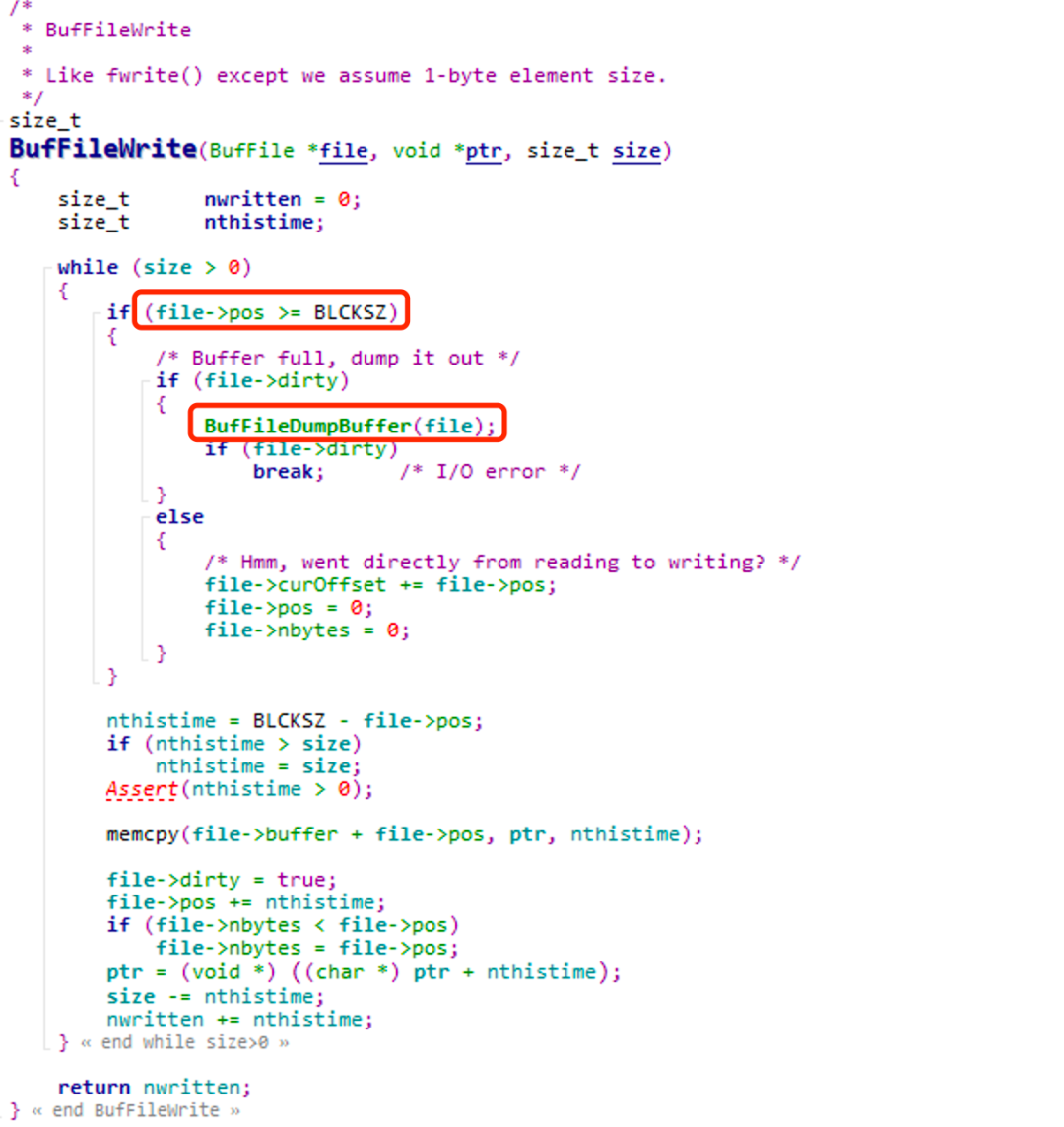
可以看到当写入偏移量大于等于BLCKSZ时,并且产生脏页才会去写。也就是每次写入量为BLCKSZ(默认为8192byte,代码编译时可修改)。
通过gdb跟踪来证实这个过程,数据库work_mem 和temp_buffers均配置为4MB,通过cte方式查询500MB的表的全量数据,理论上会产生490MB左右的文件。
Session1: 执行sql
Session2: attach session1 sql的pid进行跟踪
/* 给FileWrite函数设置断点,直接跳转至该断点 */(gdb) b FileWriteBreakpoint 1 at 0x7e607f: file fd.c, line 1726.(gdb) cContinuing.Breakpoint 1, FileWrite (file=4, buffer=0x14af958 '/', amount=8192, wait_event_info=167772161) at fd.c:17261726 returnCode = FileAccess(file);(gdb) cContinuing.Breakpoint 1, FileWrite (file=4, buffer=0x14af958 'C2e27888fb795074b9819d8d61fc57a29/', amount=8192, wait_event_info=167772161) at fd.c:17261726 returnCode = FileAccess(file);## 打印vfdP可以看到第一次写入的偏移量为8192(gdb) p *vfdP$1 = {fd = 9, fdstate = 3, resowner = 0x13ce858, nextFree = 5, lruMoreRecently = 0, lruLessRecently = 3, seekPos = 8192, fileSize = 8192, fileName = 0x13b7bf0 'base/pgsql_tmp/pgsql_tmp9902.0', fileFlags = 2, fileMode = 384}(gdb) cContinuing.Breakpoint 1, FileWrite (file=4, buffer=0x14af958 '978ca6ff43a5ca70e0b/', amount=8192, wait_event_info=167772161) at fd.c:17261726 returnCode = FileAccess(file);/* 可以看到第二次写入的偏移量为16384,差值刚好为8192 */(gdb) p *vfdP$2 = {fd = 9, fdstate = 3, resowner = 0x13ce858, nextFree = 5, lruMoreRecently = 0, lruLessRecently = 3, seekPos = 16384, fileSize = 16384, fileName = 0x13b7bf0 'base/pgsql_tmp/pgsql_tmp9902.0', fileFlags = 2, fileMode = 384}(gdb)
ll查看本地文件,可以看到第一次写入后文件大小为8192,第二次写入后大小为16384。
[postgres@postgres:pg10.4:5404 ~/postgresql-10.4]$ll /data/pg10-4debug/data/base/pgsql_tmptotal 8-rw------- 1 postgres postgres 8192 May 15 22:21 pgsql_tmp9902.0[postgres@postgres:pg10.4:5404 ~/postgresql-10.4]$ll /data/pg10-4debug/data/base/pgsql_tmptotal 16-rw------- 1 postgres postgres 16384 May 15 22:41 pgsql_tmp9902.0[postgres@postgres:pg10.4:5404 ~/postgresql-10.4]$
来看下stack,可以看到sql执行时tempfile产生的整个函数调用栈。
(gdb) bt #0 FileWrite (file=4, buffer=0x14af958 '978ca6ff43a5ca70e0b/', amount=8192, wait_event_info=167772161) at fd.c:1726#1 0x00000000007e8814 in BufFileDumpBuffer (file=0x14af918) at buffile.c:324#2 0x00000000007e8a9d in BufFileWrite (file=0x14af918, ptr=0x14bf808, size=5) at buffile.c:424#3 0x00000000009b16a3 in writetup_heap (state=0x14a61c8, tup=0x14bf7d8) at tuplestore.c:1519#4 0x00000000009b0e6c in dumptuples (state=0x14a61c8) at tuplestore.c:1223#5 0x00000000009b047c in tuplestore_puttuple_common (state=0x14a61c8, tuple=0x7fcdf6bc9b68) at tuplestore.c:832#6 0x00000000009b01f2 in tuplestore_puttupleslot (state=0x14a61c8, slot=0x14a5d38) at tuplestore.c:720#7 0x00000000006aa525 in CteScanNext (node=0x14a60b8) at nodeCtescan.c:124#8 0x0000000000682b2a in ExecScanFetch (node=0x14a60b8, accessMtd=0x6aa39c <CteScanNext>, recheckMtd=0x6aa548 <CteScanRecheck>) at execScan.c:97#9 0x0000000000682b99 in ExecScan (node=0x14a60b8, accessMtd=0x6aa39c <CteScanNext>, recheckMtd=0x6aa548 <CteScanRecheck>) at execScan.c:147#10 0x00000000006aa585 in ExecCteScan (pstate=0x14a60b8) at nodeCtescan.c:164#11 0x000000000067a3d8 in ExecProcNode (node=0x14a60b8) at ../../../src/include/executor/executor.h:250#12 0x000000000067c81b in ExecutePlan (estate=0x14a5828, planstate=0x14a60b8, use_parallel_mode=0 '\000', operation=CMD_SELECT, sendTuples=1 '\001', numberTuples=0, direction=ForwardScanDirection, dest=0x14a8318, execute_once=1 '\001') at execMain.c:1722#13 0x000000000067a874 in standard_ExecutorRun (queryDesc=0x1493a58, direction=ForwardScanDirection, count=0, execute_once=1 '\001') at execMain.c:363#14 0x00007fcdfff256bb in pgss_ExecutorRun (queryDesc=0x1493a58, direction=ForwardScanDirection, count=0, execute_once=1 '\001') at pg_stat_statements.c:889#15 0x000000000067a6f6 in ExecutorRun (queryDesc=0x1493a58, direction=ForwardScanDirection, count=0, execute_once=1 '\001') at execMain.c:304#16 0x000000000081ca66 in PortalRunSelect (portal=0x1494618, forward=1 '\001', count=0, dest=0x14a8318) at pquery.c:932#17 0x000000000081c73c in PortalRun (portal=0x1494618, count=9223372036854775807, isTopLevel=1 '\001', run_once=1 '\001', dest=0x14a8318, altdest=0x14a8318, completionTag=0x7ffe2d2ae7b0 '') at pquery.c:773#18 0x0000000000816cc9 in exec_simple_query (query_string=0x13b01f8 'with c as (select * from tbl_test) select * from c;') at postgres.c:1099#19 0x000000000081ac90 in PostgresMain (argc=1, argv=0x13c7e60, dbname=0x13c7d08 'postgres', username=0x1393da8 'postgres') at postgres.c:4088#20 0x000000000078dd6c in BackendRun (port=0x13b7a10) at postmaster.c:4405#21 0x000000000078d515 in BackendStartup (port=0x13b7a10) at postmaster.c:4077#22 0x0000000000789d96 in ServerLoop () at postmaster.c:1755#23 0x000000000078941d in PostmasterMain (argc=1, argv=0x1391c70) at postmaster.c:1363#24 0x00000000006d1616 in main (argc=1, argv=0x1391c70) at main.c:228(gdb)
2.tempfile消除过程
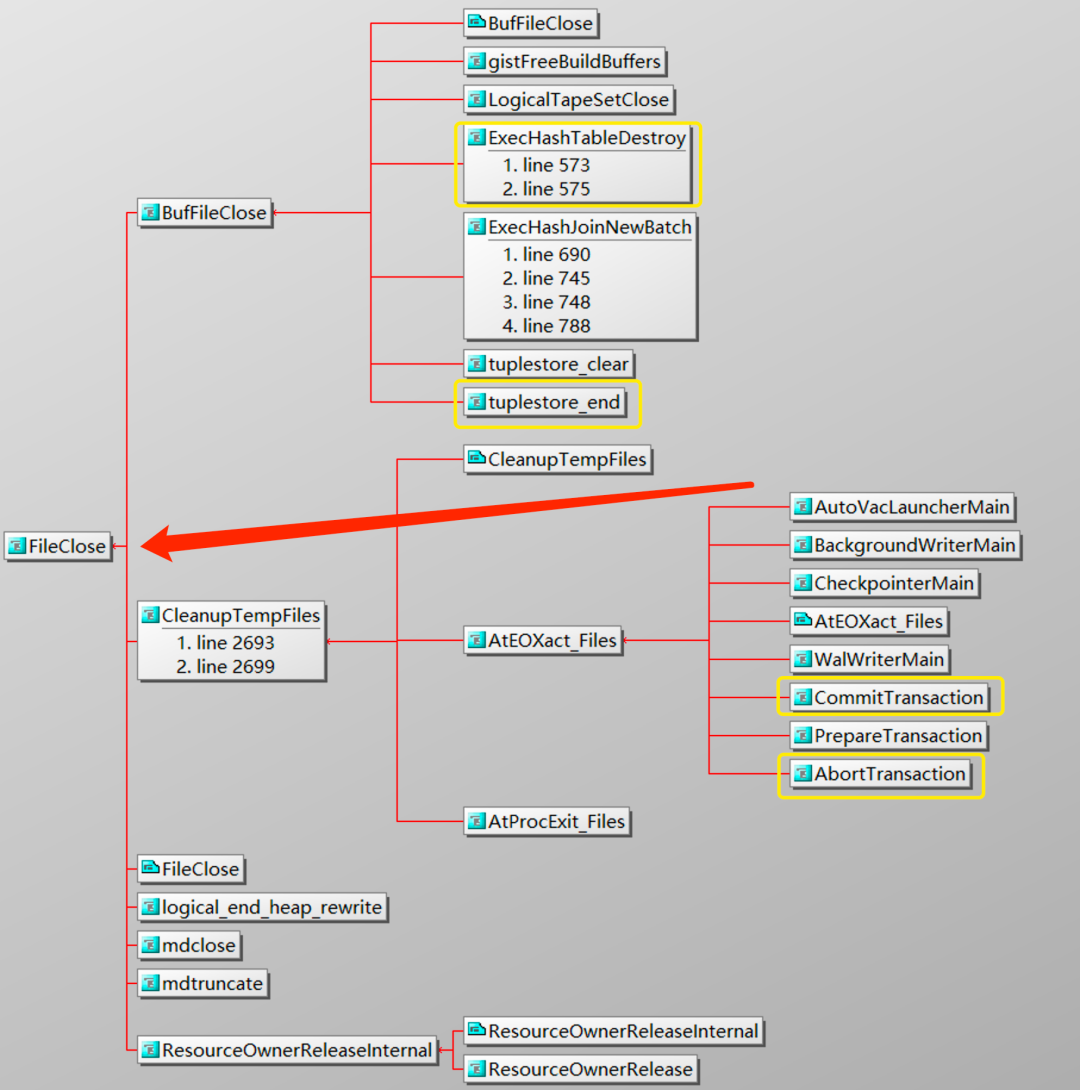
同样从FileClose函数调用分支可以看到,函数入口有ExecHashJoinTableDestroy、CommitTransaction、AbortTransaction等。也就是在hashjoin结束后,以及sql提交或者回滚执行完成后,会调用FileClose消除tempfile。
另外在数据库启动时PostMaster守护进程会调用RemovePgTempFiles()函数删除之前可能残留的tempfile。(为什么会出现临时文件残留的情况文章最后会重点讨论)
当配置了temp_file_limit参数,文件超过配置大小,会进入Abortransaction流程释放文件。
接着调试文件消除过程。
Session2: 继续attach session sql pid
Session3: 使用pg_terminate_backend()函数终止sql查询,查询回滚
来看跟踪过程
/* 设置断点2 */ (gdb) b FileCloseBreakpoint 2 at 0x7e5c4d: file fd.c, line 1507.(gdb) n## 这时session 3执行了pg_terminate_backend(), sql进程收到了signal SIGTERM Program received signal SIGTERM, Terminated.(gdb) cContinuing./* 跳转至FileClose */Breakpoint 2, FileClose (file=4) at fd.c:15071507 vfdP = &VfdCache[file];1509 if (!FileIsNotOpen(file))(gdb) 1512 if (close(vfdP->fd))/* 打印vfdP,注意fileName,稍后使用unlink删除该文件 */(gdb) p *vfdP $3 = {fd = 9, fdstate = 3, resowner = 0x13ce858, nextFree = 5, lruMoreRecently = 0, lruLessRecently = 3, seekPos = 2236416, fileSize = 2236416, fileName = 0x13b7bf0 'base/pgsql_tmp/pgsql_tmp9902.0', fileFlags = 2, fileMode = 384}(gdb) n1515 --nfile;(gdb) 1516 vfdP->fd = VFD_CLOSED;(gdb) 1519 Delete(file);(gdb) 1525 if (vfdP->fdstate & FD_TEMPORARY)(gdb) 1537 vfdP->fdstate &= ~FD_TEMPORARY;(gdb) 1540 temporary_files_size -= vfdP->fileSize;(gdb) 1541 vfdP->fileSize = 0;(gdb) 1544 if (stat(vfdP->fileName, &filestats))(gdb) 1547 stat_errno = 0;(gdb) /* 这里删除了fileName,即tempfile */1550 if (unlink(vfdP->fileName))(gdb) 1554 if (stat_errno == 0)(gdb)
ll查看文件已经被删除
[postgres@postgres:pg10.4:5404 ~/postgresql-10.4]$ll /data/pg10-4debug/data/base/pgsql_tmptotal 0[postgres@postgres:pg10.4:5404 ~/postgresql-10.4]$
来看下删除逻辑的stack
(gdb) bt#0 FileClose (file=4) at fd.c:1507#1 0x00000000009a17c1 in ResourceOwnerReleaseInternal (owner=0x13ce858, phase=RESOURCE_RELEASE_AFTER_LOCKS, isCommit=0 '\000', isTopLevel=1 '\001') at resowner.c:669#2 0x00000000009a1435 in ResourceOwnerReleaseInternal (owner=0x13d3980, phase=RESOURCE_RELEASE_AFTER_LOCKS, isCommit=0 '\000', isTopLevel=1 '\001') at resowner.c:506#3 0x00000000009a1393 in ResourceOwnerRelease (owner=0x13d3980, phase=RESOURCE_RELEASE_AFTER_LOCKS, isCommit=0 '\000', isTopLevel=1 '\001') at resowner.c:482#4 0x000000000050bc1f in AbortTransaction () at xact.c:2603#5 0x000000000050d7d2 in AbortOutOfAnyTransaction () at xact.c:4267#6 0x000000000097e406 in ShutdownPostgres (code=1, arg=0) at postinit.c:1146#7 0x00000000007ee75b in shmem_exit (code=1) at ipc.c:228#8 0x00000000007ee64f in proc_exit_prepare (code=1) at ipc.c:185#9 0x00000000007ee5bd in proc_exit (code=1) at ipc.c:102#10 0x000000000096ad15 in errfinish (dummy=0) at elog.c:543#11 0x00000000008196b6 in ProcessInterrupts () at postgres.c:2882#12 0x00000000006829b5 in ExecScanFetch (node=0x14a60b8, accessMtd=0x6aa39c <CteScanNext>, recheckMtd=0x6aa548 <CteScanRecheck>) at execScan.c:43#13 0x0000000000682b99 in ExecScan (node=0x14a60b8, accessMtd=0x6aa39c <CteScanNext>, recheckMtd=0x6aa548 <CteScanRecheck>) at execScan.c:147#14 0x00000000006aa585 in ExecCteScan (pstate=0x14a60b8) at nodeCtescan.c:164#15 0x000000000067a3d8 in ExecProcNode (node=0x14a60b8) at ../../../src/include/executor/executor.h:250#16 0x000000000067c81b in ExecutePlan (estate=0x14a5828, planstate=0x14a60b8, use_parallel_mode=0 '\000', operation=CMD_SELECT, sendTuples=1 '\001', numberTuples=0, direction=ForwardScanDirection, dest=0x14a8318, execute_once=1 '\001') at execMain.c:1722#17 0x000000000067a874 in standard_ExecutorRun (queryDesc=0x1493a58, direction=ForwardScanDirection, count=0, execute_once=1 '\001') at execMain.c:363#18 0x00007fcdfff256bb in pgss_ExecutorRun (queryDesc=0x1493a58, direction=ForwardScanDirection, count=0, execute_once=1 '\001') at pg_stat_statements.c:889#19 0x000000000067a6f6 in ExecutorRun (queryDesc=0x1493a58, direction=ForwardScanDirection, count=0, execute_once=1 '\001') at execMain.c:304#20 0x000000000081ca66 in PortalRunSelect (portal=0x1494618, forward=1 '\001', count=0, dest=0x14a8318) at pquery.c:932#21 0x000000000081c73c in PortalRun (portal=0x1494618, count=9223372036854775807, isTopLevel=1 '\001', run_once=1 '\001', dest=0x14a8318, altdest=0x14a8318, completionTag=0x7ffe2d2ae7b0 '') at pquery.c:773#22 0x0000000000816cc9 in exec_simple_query (query_string=0x13b01f8 'with c as (select * from tbl_test) select * from c;') at postgres.c:1099#23 0x000000000081ac90 in PostgresMain (argc=1, argv=0x13c7e60, dbname=0x13c7d08 'postgres', username=0x1393da8 'postgres') at postgres.c:4088#24 0x000000000078dd6c in BackendRun (port=0x13b7a10) at postmaster.c:4405#25 0x000000000078d515 in BackendStartup (port=0x13b7a10) at postmaster.c:4077#26 0x0000000000789d96 in ServerLoop () at postmaster.c:1755#27 0x000000000078941d in PostmasterMain (argc=1, argv=0x1391c70) at postmaster.c:1363#28 0x00000000006d1616 in main (argc=1, argv=0x1391c70) at main.c:228(gdb)
三、 问题讨论
之前提到了临时文件残留,那什么情况下会发生?
刚才分析了文件正常消除过程,sql执行完成,commit或者rollback。或者sql进程postgres发生ProcessInterrupts,即query cancel(recive signal SIGINT)或者query terminating (recive signal SIGTERM,query timeout)等。这些情况都有一个共同特点,sql进程未发生异常退出,也就是未发生crash。
列举几种常见的会使数据库发生crash的信号,crash之后临时文件不会删除,因为sql进程postgres收到这些信号会立即退出。
6) SIGABRT #abort9) SIGKILL #kill -911) SIGSEGV #segment fault
那这里是有风险的,设想一种极端的case,所有实例未配置temp_file_limit,机器上多个实例同时产生临时文件,并且依次发生多次OOM。那是不是有磁盘写满的风险。
我们使用signal SIGKILL即kill -9 来模拟
Session1: 查询
psql (10.4)PG干O,天天象上!Type 'help' for help.postgres=# select pg_backend_pid(); pg_backend_pid ---------------- 9396(1 row)postgres=# with c as (select * from tbl_test) select * from c;
session2: kill -9 9396
[postgres@postgres:pg10.4:5404 ~/postgresql-10.4]$kill -9 9396[postgres@postgres:pg10.4:5404 ~/postgresql-10.4]$ll /data/pg10-4debug/data/base/pgsql_tmptotal 300344-rw------- 1 postgres postgres 307552256 May 16 00:14 pgsql_tmp9396.0[postgres@postgres:pg10.4:5404 ~/postgresql-10.4]
可以看到进程kill掉后,tempfile残留。
pg本身在PostMaster启动时会清理残留tempfile,但发生crash后,没有考虑清理crash进程残留的tempfile?是设计缺陷?
其实不是,清理函数注释中有这么一句话。
NOTE: we could, but don’t, call this during a post-backend-crash restart cycle. The argument for not doing it is that someone might want to examine the temp files for debugging purposes.
就是说,在crash后没清理残留tempfile,是考虑有些情况下需要调试这些文件。
仅仅因为这个原因的话感觉没有考虑到极端情况的风险,因此我尝试加入crash后清理tempfile的逻辑。(这里其实可以考虑加一个控制参数,选择crash后清理或者不清理)
Crash后具体会发生什么不详细讨论,我们都知道数据库要进行recovery,也就是主进程会干掉syslogger之外的所有的子进程,并重新拉起startup进行redo,之后再拉起其余子进程恢复。
那可以在startup 中加入清理逻辑,代码修改如下:
/* ---------------------------------- * Startup Process main entry point * ---------------------------------- */voidStartupProcessMain(void){ /* * Properly accept or ignore signals the postmaster might send us. */ pqsignal(SIGHUP, StartupProcSigHupHandler); /* reload config file */ pqsignal(SIGINT, SIG_IGN); /* ignore query cancel */ pqsignal(SIGTERM, StartupProcShutdownHandler); /* request shutdown */ pqsignal(SIGQUIT, startupproc_quickdie); /* hard crash time */ InitializeTimeouts(); /* establishes SIGALRM handler */ pqsignal(SIGPIPE, SIG_IGN); pqsignal(SIGUSR1, StartupProcSigUsr1Handler); pqsignal(SIGUSR2, StartupProcTriggerHandler); /* * Reset some signals that are accepted by postmaster but not here */ pqsignal(SIGCHLD, SIG_DFL); pqsignal(SIGTTIN, SIG_DFL); pqsignal(SIGTTOU, SIG_DFL); pqsignal(SIGCONT, SIG_DFL); pqsignal(SIGWINCH, SIG_DFL); /* * Register timeouts needed for standby mode */ RegisterTimeout(STANDBY_DEADLOCK_TIMEOUT, StandbyDeadLockHandler); RegisterTimeout(STANDBY_TIMEOUT, StandbyTimeoutHandler); RegisterTimeout(STANDBY_LOCK_TIMEOUT, StandbyLockTimeoutHandler); /* * Unblock signals (they were blocked when the postmaster forked us) */ PG_SETMASK(&UnBlockSig); /* Modify by Nickxyang at 2021-05-15 PM * After the database crash, clean up the tempfile that may remain */ /* 调用清理函数 */ RemovePgTempFiles(); /* * Do what we came for. */ StartupXLOG(); /* * Exit normally. Exit code 0 tells postmaster that we completed recovery * successfully. */ proc_exit(0);}
重新编译后重启并测试
Session1:查询
[postgres@postgres:pg10.4:5404 ~]$psqlpsql (10.4)PG干O,天天象上!Type 'help' for help.postgres=# select pg_backend_pid(); pg_backend_pid ---------------- 16153(1 row)postgres=# with c as (select * from tbl_test) select * from c;
session2:kill -9 16153
[postgres@postgres:pg10.4:5404 ~/postgresql-10.4]$kill -9 16153
[postgres@postgres:pg10.4:5404 ~/postgresql-10.4]$ll /data/pg10-4debug/data/base/pgsql_tmp
total 0
[postgres@posgres:pg10.4:5404 ~/postgresql-10.4]$
可以看到tempfile已经被清理,经过多次测试,符合预期。
RemovePgTempFiles函数定义位于fd.c,有兴趣可以翻阅对应源码。





新闻|Babelfish使PostgreSQL直接兼容SQL Server应用程序

更多新闻资讯,行业动态,技术热点,请关注中国PostgreSQL分会官方网站
https://www.postgresqlchina.com
中国PostgreSQL分会生态产品
https://www.pgfans.cn
中国PostgreSQL分会资源下载站
https://www.postgreshub.cn

点赞、在看、分享、收藏
