



介绍
本文档将介绍如何通过Amazon Web Services(AWS)弹性计算将Oracle GoldenGate(OGG)复制从Amazon Relational Database Service(RDS)MySQL数据库配置到Oracle公共云(OPC)上的Oracle数据库云服务(DBCS)云(EC2)和Oracle GoldenGate云服务(GGCS)。
以下主题不包括在本文的范围内:
在Amazon EC2 Linux实例上安装MySQL数据库
在Amazon EC2 Linux实例上安装Oracle GoldenGate for MySQL数据库
配置Oracle GGCS实例
配置Oracle DBCS实例
配置Amazon EC2 Linux实例
提供Amazon RDS MySQL数据库实例
假设Amazon EC2和RDS与Oracle GGCS和DBCS一起被提供,MySQL数据库与Oracle GoldenGate软件一起安装在Amazon EC2实例上。
本文中提供的脚本和信息仅用于教育目的。 它们不受Oracle开发或支持的支持,并且在用于准备本文的测试系统以外的任何环境中不保证或保证功能。
有关OGG安装和配置DBCS和GGCS的详细信息,请查看以下Oracle文档链接:
安装Oracle GoldenGate for MySQL数据库
提供Oracle数据库云服务
提供Oracle GoldenGate云服务
有关供应Amazon EC2和RDS的详细信息,请查看以下Amazon Web Services(AWS)文档链接:
提供Amazon RDS MySQL数据库实例
提供Amazon EC2 Linux实例
有关在Linux实例上安装MySQL的详细信息,请查看以下MySQL文档链接:
在Linux上安装MySQL
GoldenGate云服务(GGCS)
GoldenGate云服务(GGCS)是驻留在Oracle公共云(OPC)中的基于云的实时数据集成和复制服务。 它提供从各种室内关系数据库到数据库中的数据,从而将数据从各种不间断的数据移动到具有亚秒级延迟的同时保持数据一致性并提供容错能力和弹性。
图1: GoldenGate云服务(GGCS)架构图
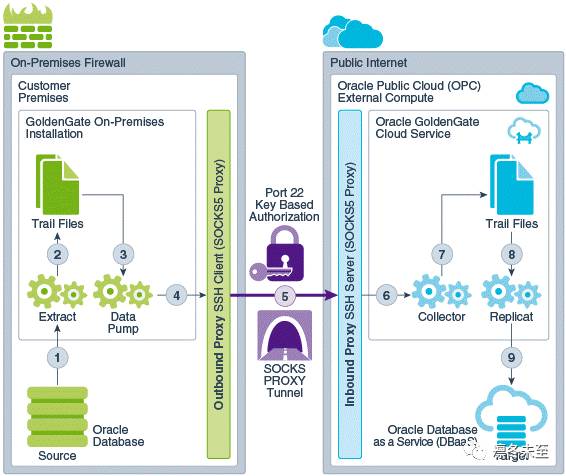
OGG通过GGCS从Amazon RDS MySQL数据库复制到Oracle DBCS
Oracle GoldenGate版本12c目前不支持从Amazon RDS MySQL数据库直接捕获,但它可以与MySQL Native复制同时运行。
要从Amazon RDS MySQL数据库捕获数据事务,我们需要在EC2实例上部署第二个MySQL数据库,并将其配置为具有RDS MySQL数据库作为主数据库的MySQL本机复制,并将EC2实例上的MySQL数据库作为从属机器; 然后在EC2实例上部署GoldenGate,并配置OGG从MySQL从属数据库中进行捕获。
图2:从Amazon RDS MySQL到Oracle DBaaS的GoldenGate部署复制
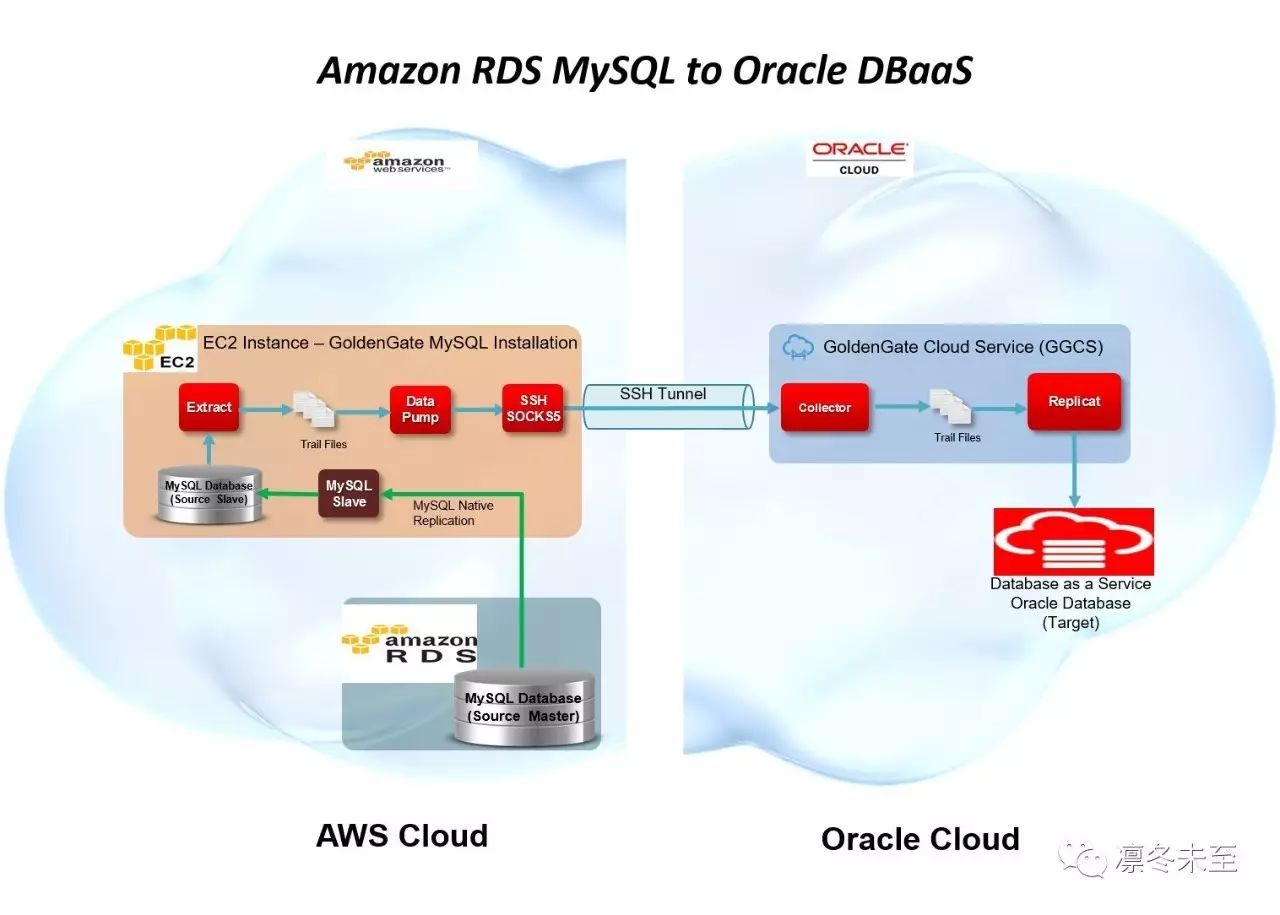
亚马逊EC2上的Oracle GoldenGate的先决条件
以下是准备GoldenGate从Amazon RDS MySQL数据库捕获事务需要做的步骤:
在Amazon RDS MySQL数据库上设置所需的MySQL数据库参数
在RDS MySQL数据库(主)和EC2 MySQL数据库(从属)之间配置MySQL本地复制
在Amazon RDS MySQL数据库上设置所需的MySQL数据库参数
创建一个单独的RDS数据库参数组,具有以下初始化参数集:
binlog_format参数设置为ROW
有关如何创建或修改Amazon RDS数据库参数组的详细信息,请查看以下Amazon Web Services(AWS)文档链接:
创建Amazon RDS DB参数组
修改Amazon RDS DB参数组中的参数
在RDS之间配置MySQL本地复制MySQL(主)和EC2 MySQL(从)
以下是在RDS MySQL(主)和EC2 MySQL(从属)之间配置MySQL本机复制的高级步骤:
在RDS MySQL上设置二进制日志的更长保留时间
在RDS MySQL上创建复制用户
修改EC2 MySQL配置文件(/etc/my.cnf)以支持从属复制
在EC2 MySQL上设置MySQL本机复制的起点
启动EC2 MySQL本地复制过程
设置RDS MySQL binlog保留时间框架
由于我们无法直接访问RDS MySQL数据库上的二进制日志,因此我们需要修改其二进制日志的保留时间,以适应足以确保将更改应用于从属数据库的时间在Amazon RDS删除binlog文件之前。
要设置RDS MySQL上二进制日志的保留时间,您需要通过EC2实例的mysql连接到RDS MySQL数据库,并执行Amazon的mysql过程“mysql.rds_set_configuration”。
要找到RDS MySQL数据库引擎连接的正确主机,您需要从Amazon RDS仪表板中找到RDS MySQL数据库端点,并将其用作您的mysql命令的主机字符串。
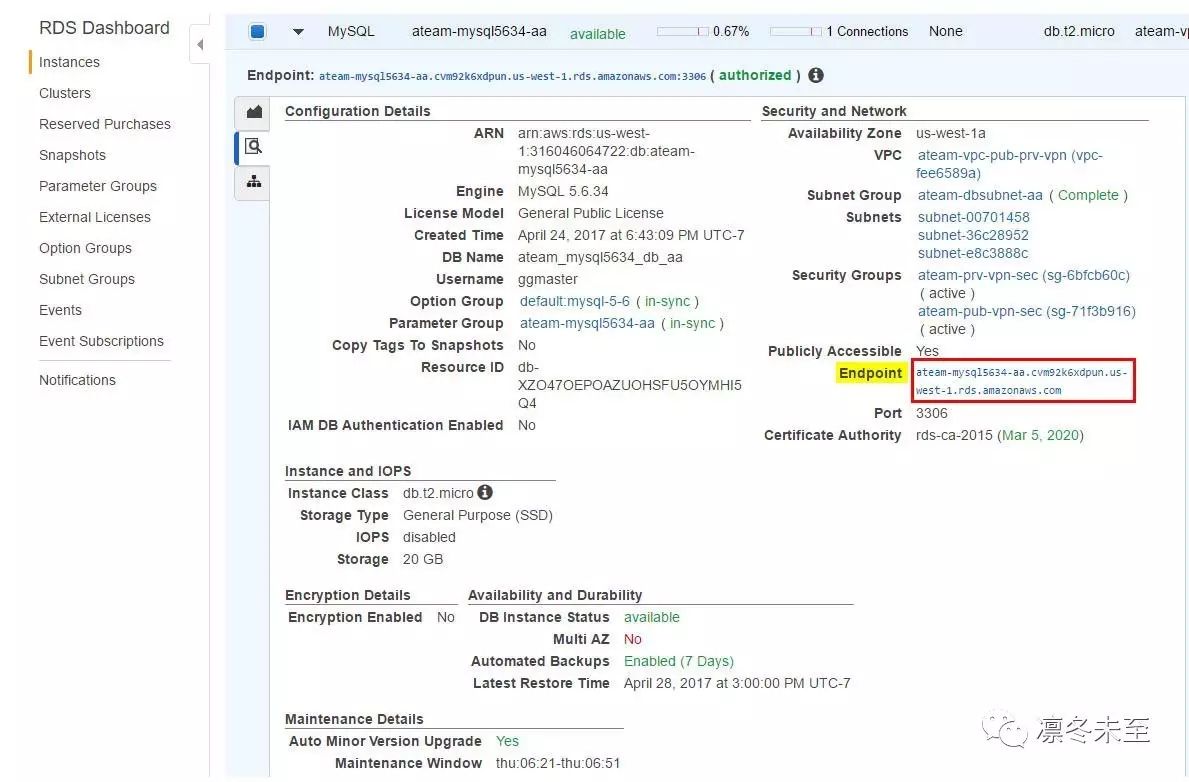
通过mysql登录到RDS MySQL,并将其设置为binlog保留时间范围(例如:7天= 168小时)。
[ec2-user@ip-10-0-1-12 ~]$ mysql -h ateam-mysql5634-aa.cvm92k6xdpun.us-west-1.rds.amazonaws.com -u ggmaster -p
Enter password:Welcome to the MySQL monitor. Commands end with ; or \g.Your MySQL connection id is 147Server version: 5.6.34-log MySQL Community Server (GPL)Copyright (c) 2000, 2016, Oracle and/or its affiliates. All rights reserved.Oracle is a registered trademark of Oracle Corporation and/or itsaffiliates. Other names may be trademarks of their respectiveowners.Type ‘help;’ or ‘\h’ for help. Type ‘\c’ to clear the current input statement.mysql>
mysql> CALL mysql.rds_set_configuration(‘binlog retention hours’, 168);
Query OK, 0 rows affected (0.19 sec)
在RDS MySQL上创建MySQL本机复制用户
现在,我们需要创建一个数据库用户,我们的本地MySQL复制过程从EC2 MySQL将用于连接到RDS MySQL数据库并授予从属复制权限。
通过mysql登录到RDS MySQL,创建数据库从站复制用户。
[ec2-user@ip-10-0-1-12 ~]$ mysql -h ateam-mysql5634-aa.cvm92k6xdpun.us-west-1.rds.amazonaws.com -u ggmaster -p
Enter password:Welcome to the MySQL monitor. Commands end with ; or \g.Your MySQL connection id is 7Server version: 5.6.34-log MySQL Community Server (GPL)Copyright (c) 2000, 2016, Oracle and/or its affiliates. All rights reserved.Oracle is a registered trademark of Oracle Corporation and/or itsaffiliates. Other names may be trademarks of their respectiveowners.Type ‘help;’ or ‘\h’ for help. Type ‘\c’ to clear the current input statement.mysql>
mysql> create user ‘ggslave’@’%’ IDENTIFIED BY ‘ggpass’;
Query OK, 0 rows affected (0.04 sec)
现在,我们向新创建的用户授予从属复制权限。
mysql> grant replication slave on *.* TO ‘ggslave’@’%’;
Query OK, 0 rows affected (0.00 sec)
配置EC2 MySQL以支持MySQL本地复制
在Linux上,/etc/my.cnf是默认的MySQL配置文件。 该文件需要修改以配置MySQL本地复制,一旦配置文件被修改,mysql数据库引擎需要重新启动才能生效。
以下是用于此测试的示例/etc/my.cnf文件:
[mysqld]
datadir=/var/lib/mysql
socket=/var/lib/mysql/mysql.sock
symbolic-links=0
server-id=987321
log-bin=bin.log
log-bin-index=bin-log.index
max_binlog_size=100
binlog_format=row
log_slave_updates=1
[mysqld_safe]
log-error=/var/log/mysqld.log
pid-file=/var/run/mysqld/mysqld.pid
在/etc/my.cnf文件被修改之后,我们需要重新启动MySQL数据库引擎(mysqld),以使更改生效,通过服务命令作为root或通过sudo:
[ec2-user@ip-10-0-1-12 ~]$ sudo service mysqld restart
Stopping mysqld: [ OK ]Starting mysqld: [ OK ]
在EC2 MySQL实例上设置MySQL本机复制的起点
现在,我们准备在EC2 MySQL上设置从机复制过程的起点。 我们需要通过mysql“show master status”命令来查询RDS MySQL的二进制日志的状态,这将是我们的主数据库。 我们将使用这些信息作为我们的EC2 MySQL从站复制的出发点。
[ec2-user@ip-10-0-1-12 ~]$ mysql -h ateam-mysql5634-aa.cvm92k6xdpun.us-west-1.rds.amazonaws.com -u ggmaster -p
Enter password:Welcome to the MySQL monitor. Commands end with ; or \g.Your MySQL connection id is 1154Server version: 5.6.34-log MySQL Community Server (GPL)Copyright (c) 2000, 2016, Oracle and/or its affiliates. All rights reserved.Oracle is a registered trademark of Oracle Corporation and/or itsaffiliates. Other names may be trademarks of their respectiveowners.Type ‘help;’ or ‘\h’ for help. Type ‘\c’ to clear the current input statement.mysql>
mysql> show master status;
+—————————-+———-+————–+——————+——————-+| File | Position | Binlog_Do_DB | Binlog_Ignore_DB | Executed_Gtid_Set |+—————————-+———-+————–+——————+——————-+| mysql-bin-changelog.001144 | 422 | | | |+—————————-+———-+————–+——————+——————-+1 row in set (0.01 sec)
记下“File”( mysql-bin-changelog.001144 )和“Position”( 422 )的值,当我们配置和启动时,我们将使用这些值作为EC2 MySQL复制从站的起始点从属进程。
现在我们登录到EC2 MySQL数据库(slave - localhost),并将EC2 MySQL的从属复制流程设置为使用RDS MySQL作为主机,并设定起点。
[ec2-user@ip-10-0-1-12 ~]$ mysql -h localhost -u root -p
Enter password:Welcome to the MySQL monitor. Commands end with ; or \g.Your MySQL connection id is 1154Server version: 5.6.35-log MySQL Community Server (GPL)Copyright (c) 2000, 2016, Oracle and/or its affiliates. All rights reserved.Oracle is a registered trademark of Oracle Corporation and/or itsaffiliates. Other names may be trademarks of their respectiveowners.Type ‘help;’ or ‘\h’ for help. Type ‘\c’ to clear the current input statement.mysql>
mysql> change master to master_host=’ateam-mysql5634-aa.cvm92k6xdpun.us-west-1.rds.amazonaws.com’, master_password=’ggpass’, master_user=’ggslave’, master_log_file=’mysql-bin-changelog.001144′, master_log_pos=422;
启动EC2 MySQL本地复制过程
现在,我们配置了EC2的MySQL复制指向RSD的MySQL作为主设备的起点,我们现在可以启动从机复制过程。
[ec2-user@ip-10-0-1-12 ~]$ mysql -h localhost -u root -p
Enter password:Welcome to the MySQL monitor. Commands end with ; or \g.Your MySQL connection id is 398Server version: 5.6.35-log MySQL Community Server (GPL)Copyright (c) 2000, 2016, Oracle and/or its affiliates. All rights reserved.Oracle is a registered trademark of Oracle Corporation and/or itsaffiliates. Other names may be trademarks of their respectiveowners.Type ‘help;’ or ‘\h’ for help. Type ‘\c’ to clear the current input statement.mysql>
mysql> start slave;
Query OK, 0 rows affected (0.00 sec)
现在,我们来看一下从属进程的状态:
mysql> show slave status\G
*************************** 1. row ***************************Slave_IO_State: Waiting for master to send eventMaster_Host: ateam-mysql5634-aa.cvm92k6xdpun.us-west-1.rds.amazonaws.comMaster_User: ggslaveMaster_Port: 3306Connect_Retry: 60Master_Log_File: mysql-bin-changelog.001144Read_Master_Log_Pos: 422Relay_Log_File: mysqld-relay-bin.000002Relay_Log_Pos: 293Relay_Master_Log_File: mysql-bin-changelog.001144Slave_IO_Running: YesSlave_SQL_Running: YesReplicate_Do_DB:Replicate_Ignore_DB:Replicate_Do_Table:Replicate_Ignore_Table:Replicate_Wild_Do_Table:Replicate_Wild_Ignore_Table:Last_Errno: 0Last_Error:Skip_Counter: 0Exec_Master_Log_Pos: 422Relay_Log_Space: 467Until_Condition: NoneUntil_Log_File:Until_Log_Pos: 0Master_SSL_Allowed: NoMaster_SSL_CA_File:Master_SSL_CA_Path:Master_SSL_Cert:Master_SSL_Cipher:Master_SSL_Key:Seconds_Behind_Master: 0Master_SSL_Verify_Server_Cert: NoLast_IO_Errno: 0Last_IO_Error:Last_SQL_Errno: 0Last_SQL_Error:Replicate_Ignore_Server_Ids:Master_Server_Id: 1476793473Master_UUID: 737e38be-2958-11e7-a5cc-06eeef0cc0baMaster_Info_File: var/lib/mysql/master.infoSQL_Delay: 0SQL_Remaining_Delay: NULLSlave_SQL_Running_State: Slave has read all relay log; waiting for the slave I/O thread to update itMaster_Retry_Count: 86400Master_Bind:Last_IO_Error_Timestamp:Last_SQL_Error_Timestamp:Master_SSL_Crl:Master_SSL_Crlpath:Retrieved_Gtid_Set:Executed_Gtid_Set:Auto_Position: 01 row in set (0.00 sec)
现在,我们来验证我们通过创建数据库(tcustdb)和表(TCUSTMER&TCUSTORD)将用于RDS MySQL上的Oracle GoldenGate复制,从而在RDS MySQL(主)和EC2 MySQL(从属)数据库之间进行有效的MySQL本机复制,并确保它被复制到EC2 MySQL。
首先,我们来验证两个MySQL数据库中都不存在“tcustdb”模式/数据库。
RDS MySQL数据库:
[ec2-user@ip-10-0-1-12 ~]$ mysql -h ateam-mysql5634-aa.cvm92k6xdpun.us-west-1.rds.amazonaws.com -u ggmaster -p
Enter password:Welcome to the MySQL monitor. Commands end with ; or \g.Your MySQL connection id is 1244Server version: 5.6.34-log MySQL Community Server (GPL)Copyright (c) 2000, 2016, Oracle and/or its affiliates. All rights reserved.Oracle is a registered trademark of Oracle Corporation and/or itsaffiliates. Other names may be trademarks of their respectiveowners.Type ‘help;’ or ‘\h’ for help. Type ‘\c’ to clear the current input statement.mysql>
mysql> show databases like ‘tcustdb’;
Empty set (0.00 sec)
EC2 MySQL数据库:
[ec2-user@ip-10-0-1-12 ~]$ mysql -h ateam-mysql5634-aa.cvm92k6xdpun.us-west-1.rds.amazonaws.com -u ggmaster -p
Enter password:Welcome to the MySQL monitor. Commands end with ; or \g.Your MySQL connection id is 9Server version: 5.6.35-log MySQL Community Server (GPL)Copyright (c) 2000, 2016, Oracle and/or its affiliates. All rights reserved.Oracle is a registered trademark of Oracle Corporation and/or itsaffiliates. Other names may be trademarks of their respectiveowners.Type ‘help;’ or ‘\h’ for help. Type ‘\c’ to clear the current input statement.mysql>
mysql> show databases like ‘tcustdb’;
Empty set (0.00 sec)
第二,现在我们验证'tcustdb'不存在,让我们在RDS MySQL上创建它,并在tcustdb数据库上创建TCUSTMER&TCUSTORD表,并验证它被复制到EC2 MySQL数据库。
RDS MySQL数据库:
[ec2-user@ip-10-0-1-12 ogg12c_mysql56]$ mysql -h ateam-mysql5634-aa.cvm92k6xdpun.us-west-1.rds.amazonaws.com -u ggmaster -p
Enter password:Welcome to the MySQL monitor. Commands end with ; or \g.Your MySQL connection id is 1250Server version: 5.6.34-log MySQL Community Server (GPL)Copyright (c) 2000, 2016, Oracle and/or its affiliates. All rights reserved.Oracle is a registered trademark of Oracle Corporation and/or itsaffiliates. Other names may be trademarks of their respectiveowners.Type ‘help;’ or ‘\h’ for help. Type ‘\c’ to clear the current input statement.mysql>
mysql> create database tcustdb;
Query OK, 1 row affected (0.01 sec)
mysql> use tcustdb;
Database changed
现在,我们通过在OGG安装目录中找到的创建表脚本“demo_mysql_create.sql”创建表(TCUSTMER和TCUSTORD)。
mysql> source demo_mysql_create.sql;
Query OK, 0 rows affected (0.10 sec)Query OK, 0 rows affected (0.03 sec)
mysql> show tables;
+——————-+| Tables_in_tcustdb |+——————-+| TCUSTMER || TCUSTORD |+——————-+2 rows in set (0.00 sec)
现在,我们来验证“tcustdb”数据库和TCUSTMER和TCUSTORD表是否已经被填充到EC2 MySQL数据库中。
EC2 MySQL数据库:
[ec2-user@ip-10-0-1-12 ~]$ mysql -h localhost -u root -p
Enter password:Welcome to the MySQL monitor. Commands end with ; or \g.Your MySQL connection id is 10Server version: 5.6.35-log MySQL Community Server (GPL)Copyright (c) 2000, 2016, Oracle and/or its affiliates. All rights reserved.Oracle is a registered trademark of Oracle Corporation and/or itsaffiliates. Other names may be trademarks of their respectiveowners.Type ‘help;’ or ‘\h’ for help. Type ‘\c’ to clear the current input statement.mysql>
我们首先通过“show processlist”命令检查从机复制的进程状态:
mysql> show processlist;
+—-+————-+———–+——+———+——+—————————————————————————–+——————+| Id | User | Host | db | Command | Time | State | Info |+—-+————-+———–+——+———+——+—————————————————————————–+——————+| 6 | system user | | NULL | Connect | 3489 | Waiting for master to send event | NULL || 7 | system user | | NULL | Connect | 254 | Slave has read all relay log; waiting for the slave I/O thread to update it | NULL || 10 | root | localhost | NULL | Query | 0 | init | show processlist |+—-+————-+———–+——+———+——+—————————————————————————–+——————+
由于状态表示所有继电器日志已被读取,我们来验证是否已经创建了“tcustdb”和“TCUSTMER”和“TCUSTORD”。
mysql> show databases like ‘tcustdb’;
+——————–+| Database (tcustdb) |+——————–+| tcustdb |+——————–+1 row in set (0.00 sec)
mysql> use tcustdb;
Database changed
mysql> show tables;
+——————-+| Tables_in_tcustdb |+——————-+| TCUSTMER || TCUSTORD |+——————-+2 rows in set (0.00 sec)
现在,我们在RDS MySQL(Master)和EC2 MySQL(从属)之间有一个有效的MySQL本机复制,我们可以继续配置Oracle GoldenGate软件,使用我们在EC2 MySQL上配置的从属数据库来捕获来自Amazon RDS MySQL的数据,因为它是源数据库。
OGG通过GGCS从Amazon RDS MySQL数据库复制到Oracle DBCS
我们将使用我们为EC2 MySQL配置的MySQL本机复制的从属复制数据库作为Oracle GoldenGate的源数据库。 实质上,我们正在捕获从RDS MySQL(主)到EC2 MySQL(从属)的MySQL本机复制复制的数据。
既然,我们已经在RDS MySQL(主)和EC2 MySQL(从属)之间已经配置了运行的MySQL Native复制,我们只需要配置OGG来使用EC2 MySQL数据库作为捕获过程的源头。
从Oracle公共云(OPC)中的EC2 MySQL( 从属/ ogg源 )到DBaaS DBCS( 目标 )数据库的OGG复制的高级步骤如下:
在OPC端配置和启动GGCS Oracle GoldenGate Manager
在Amazon EC2实例上配置和启动SSH代理服务器进程
在Amazon EC2实例上配置和启动OGG Extract进程
在Amazon EC2实例上配置和启动OGG Extract Data Pump进程
在OPC端配置和启动GGCS Replicat进程,将数据传送到目标DBaaS DBCS
GGCS Oracle GoldenGate经理
要开始在GGCS实例上配置Oracle GoldenGate,管理器进程必须正在运行。 管理器是实例化其他Oracle GoldenGate进程的控制器进程,例如Extract,Extract Data Pump,Collector和Replicat进程。
通过ssh连接到GGCS实例,并通过GoldenGate软件命令界面(GGSCI)启动Manager进程。
mpapio@borg:~$ ssh -i ateam_opc_ssh_key opc@129.144.0.216
注意:通过公共和私钥对文件保护与Oracle公共云(OPC)和Amazon Web Services(AWS)上的云服务器的SSH连接。 公钥文件存在于云服务器实例上,私钥文件作为参数传递,用于认证。 在这种用例中,我们使用“ mp_opc_ssh_key ”作为私钥文件。有关SSH密钥对的更多详细信息,请查看本文档链接 - 为OPC 生成SSH密钥对和本文档链接 - 用于AWS的Amazon EC2密钥对 。
[opc@ateam-ggcs-aa-ggcs-1 ~]$ sudo su – oracle
[oracle@ateam-ggcs-aa-ggcs-1 ~]$ cd $GGHOME
注意:默认情况下,“opc”用户是允许ssh到GGCS实例的唯一用户。 我们需要通过“su”命令将用户切换到“oracle”来管理GoldenGate进程。 环境变量$ GGHOME是在GGCS实例中预先定义的,它是GoldenGate被安装的目录。
[oracle@ateam-ggcs-aa-ggcs-1 gghome]$ ggsci
Oracle GoldenGate Command Interpreter for OracleVersion 12.2.0.1.160517 OGGCORE_12.2.0.1.0OGGBP_PLATFORMS_160711.1401_FBOLinux, x64, 64bit (optimized), Oracle 12c on Jul 12 2016 02:21:38Operating system character set identified as UTF-8.Copyright (C) 1995, 2016, Oracle and/or its affiliates. All rights reserved.
GGSCI (ateam-ggcs-aa-ggcs-1) 1> start mgr
Manager started.
GGSCI (ateam-ggcs-aa-ggcs-1) 2> info mgr
Manager is running (IP port ateam-ggcs-aa-ggcs-1.7777, Process ID 124024).
注意:默认情况下,GoldenGate进程不接受任何远程连接。 要通过SSH代理启用与其他主机的连接,我们需要向Manager参数文件(MGR.prm)添加ACCESS RULE,以允许通过GGCS实例的公共IP地址进行连接。
这是这个例子中使用的MGR.prm文件:
–###############################################################
–## MGR.prm
–## Manager Parameter Template
— Manager port number
— PORT <port number>
PORT 7777
— For allocate dynamicportlist. Here the range is starting from
— port n1 through n2.
Dynamicportlist 7740-7760
— Enable secrule for collector
ACCESSRULE, PROG COLLECTOR, IPADDR 129.144.0.216, ALLOW
— Purge extract trail files
PURGEOLDEXTRACTS ./dirdat/*, USECHECKPOINTS, MINKEEPHOURS 24
— Start one or more Extract and Replicat processes automatically
— after they fail. –AUTORESTART provides fault tolerance when
— something temporary interferes with a process, such as
— intermittent network outages or programs that interrupt access
— to transaction logs.
— AUTORESTART ER *, RETRIES <x>, WAITMINUTES <y>, RESETMINUTES <z>
— This is to specify a lag threshold that is considered
— critical, and to force a warning message to the error log.
— Lagreport parameter specifies the interval at which manager
— checks for extract replicat –lag.
–LAGREPORTMINUTES <x>
–LAGCRITICALMINUTES <y>
–Reports down processes
–DOWNREPORTMINUTES <n>
–DOWNCRITICAL
在Amazon EC2实例上启动SSH代理服务器
默认情况下,允许GGCS实例的唯一访问是通过ssh,所以为了允许从Amazon云到GGCS实例的GoldenGate进程的通信,我们需要在Amazon侧运行SSH代理服务器来与GGCS实例上的GoldenGate进程进行通信。
通过ssh连接到Amazon EC2实例并启动代理服务器。
mpapio@borg:~$ ssh -i mp_opc_ssh_key ec2-user@aws-ateam-gg-hub-mysql-aa
Last login: Sat Apr 29 01:06:30 2017
__| __|_ )
_| ( / Amazon Linux AMI
___|\___|___|
https://aws.amazon.com/amazon-linux-ami/2017.03-release-notes/
通过以下ssh命令 (全部在一行)中 启动SSH代理服务器进程 :
[ec2-user@ip-10-0-1-12 ~]$ cd ogg12c_mysql56
[ec2-user@ip-10-0-1-12 ogg12c_mysql56]$ ssh -i ateam_opc_ssh_key -v -N -f -D 127.0.0.1:8888 opc@129.144.0.216 > ./dirrpt/socks.log 2>&1
命令语法: ssh -i {private_key_file} -v -N -f -D {istening_ip_address :listening_tcp_port_address} {user} @{GGCS_Instance_IP_address} > {output_file} 2>&1
SSH命令选项说明:
-i =私钥文件
-v =详细模式
-N =不执行远程命令; 主要用于端口转发
-f =在后台运行ssh进程
-D指定作为本地动态应用级转发运行; 在指定的接口和端口上充当SOCKS代理服务器
listening_ip_address =此SOCKS代理将侦听的主机名或主机IP地址(127.0.0.1是环回地址)
listening_tcp_port_address =要侦听的TCP IP端口号
2>&1 =将Stdout和Stderr重定向到输出文件
验证SSH Socks代理服务器进程已成功启动。
通过“cat”实用程序检查socks代理输出文件,并查找“ 本地连接 转发...”和“本地转发侦听 端口 ”消息。 确保它已连接到GGCS实例并监听正确的IP和端口地址。
[ec2-user@ip-10-0-1-12 ogg12c_mysql56]$ cat ./dirrpt/socks.log
OpenSSH_6.6.1, OpenSSL 1.0.1k-fips 8 Jan 2015debug1: Reading configuration data etc/ssh/ssh_configdebug1: etc/ssh/ssh_config line 56: Applying options for *debug1: Connecting to 129.144.0.216 [129.144.0.216] port 22.debug1: Connection established.debug1: identity file ateam_opc_ssh_key type -1debug1: identity file ateam_opc_ssh_key-cert type -1debug1: Enabling compatibility mode for protocol 2.0debug1: Local version string SSH-2.0-OpenSSH_6.6.1debug1: Remote protocol version 2.0, remote software version OpenSSH_5.3debug1: match: OpenSSH_5.3 pat OpenSSH_5* compat 0x0c000000debug1: SSH2_MSG_KEXINIT sentdebug1: SSH2_MSG_KEXINIT receiveddebug1: kex: server->client aes128-ctr hmac-md5 nonedebug1: kex: client->server aes128-ctr hmac-md5 nonedebug1: kex: diffie-hellman-group-exchange-sha256 need=16 dh_need=16debug1: kex: diffie-hellman-group-exchange-sha256 need=16 dh_need=16debug1: SSH2_MSG_KEX_DH_GEX_REQUEST(1024<3072<8192) sentdebug1: expecting SSH2_MSG_KEX_DH_GEX_GROUPdebug1: SSH2_MSG_KEX_DH_GEX_INIT sentdebug1: expecting SSH2_MSG_KEX_DH_GEX_REPLYdebug1: Server host key: RSA c6:af:b3:f4:49:b0:4d:2b:8f:52:92:e8:e2:60:23:16debug1: Host ‘129.144.0.216’ is known and matches the RSA host key.
debug1: Authentication succeeded (publickey).Authenticated to 129.144.0.216 ([129.144.0.216]:22).debug1: Local connections to 127.0.0.1:8888 forwarded to remote address socks:0debug1: Local forwarding listening on 127.0.0.1 port 8888.debug1: channel 0: new [port listener]debug1: Requesting no-more-sessions@openssh.comdebug1: forking to backgrounddebug1: Entering interactive session.
在Amazon EC2实例上配置Oracle GoldenGate
对于我们的测试,我们将使用TCUSTMER和TCUSTORD表为MySQL源和Oracle目标数据库。
MySQL(源)表创建SQL语句:
CREATE TABLE TCUSTMER
(
CUST_CODE VARCHAR(4) NOT NULL,
NAME VARCHAR(30),
CITY VARCHAR(20),
STATE CHAR(2),
PRIMARY KEY (CUST_CODE)
);
CREATE TABLE TCUSTORD
(
CUST_CODE VARCHAR(4) NOT NULL,
ORDER_DATE DATETIME NOT NULL,
PRODUCT_CODE VARCHAR(8) NOT NULL,
ORDER_ID INTEGER NOT NULL,
PRODUCT_PRICE DECIMAL(8,2),
PRODUCT_AMOUNT INTEGER,
TRANSACTION_ID FLOAT,
PRIMARY KEY (CUST_CODE, ORDER_DATE, PRODUCT_CODE, ORDER_ID)
);
Oracle(目标)表创建SQL语句:
CREATE TABLE tcustmer
(
cust_code VARCHAR2(4),
name VARCHAR2(30),
city VARCHAR2(20),
state CHAR(2),
PRIMARY KEY (cust_code)
USING INDEX
);
CREATE TABLE tcustord
(
cust_code VARCHAR2(4),
order_date DATE,
product_code VARCHAR2(8),
order_id NUMBER,
product_price NUMBER(8,2),
product_amount NUMBER(6),
transaction_id NUMBER,
PRIMARY KEY (cust_code, order_date, product_code, order_id)
USING INDEX
);
在Amazon EC2实例上启动Oracle GoldenGate Manager
[ec2-user@ip-10-0-1-12 ogg12c_mysql56]$ ./ggsci
Oracle GoldenGate Command Interpreter for MySQLVersion 12.2.0.1.1 OGGCORE_12.2.0.1.0_PLATFORMS_151211.1401Linux, x64, 64bit (optimized), MySQL Enterprise on Dec 11 2015 16:23:51Operating system character set identified as UTF-8.Copyright (C) 1995, 2015, Oracle and/or its affiliates. All rights reserved.
注意: 要编辑/创建GoldenGate MGR配置/参数文件,您需要通过GGSCI实用程序执行“ 编辑参数 ”。
GGSCI (ip-10-0-1-12) 1> edit param mgr
这是这个例子中使用的MGR.prm文件:
— Manager port number
PORT 7777
— For allocate dynamicportlist. Here the range is starting from port n1 through n2.
Dynamicportlist 7740-7760
— Purge extract trail files
PURGEOLDEXTRACTS ./dirdat/*, USECHECKPOINTS, MINKEEPHOURS 24
GGSCI (ip-10-0-1-12) 2> start mgr
Manager started.
GGSCI (ip-10-0-1-12) 3> info mgr
Manager is running (IP port ip-10-0-1-12.7777, Process ID 10129).
配置和启动Oracle GoldenGate提取在线更改捕获过程
创建在线更改数据捕获提取组
对于此测试,我们将在线更改数据捕获组过程命名为ETCUSTDB。
- >通过GGSCI在GoldenGate中创建/添加提取组:
GGSCI (ip-10-0-1-12) 1> add extract etcustdb, vam, begin now
EXTRACT added.
注意: 要编辑/创建提取配置/参数文件,您需要通过GGSCI实用程序执行“ 编辑参数<group_name> ”。
GGSCI (ip-10-0-1-12) 2> edit param etcustdb
以下是本示例中使用的在线更改捕获参数(etcustdb.prm)文件:
EXTRACT etcustdb
SETENV(MYSQL_HOME=’/var/lib/mysql’)
SETENV(MYSQL_UNIX_PORT=’/var/lib/mysql/mysql.sock’)
EXTTRAIL ./dirdat/ea
SOURCEDB tcustdb@127.0.0.1, USERIDALIAS ggmysql_alias
TRANLOGOPTIONS ALTLOGDEST “/var/lib/mysql/bin-log.index”
TABLE tcustdb.TCUSTMER;
TABLE tcustdb.TCUSTORD;
通过GGSCI在线更改数据捕获提取组添加本地提取跟踪
GGSCI (ip-10-0-1-12) 3> add exttrail ./dirdat/ea, extract etcustdb
EXTTRAIL added.
通过GGSCI启动在线更改数据捕获提取组
GGSCI (ip-10-0-1-12) 4> start extract etcustdb
Sending START request to MANAGER …EXTRACT ETCUSTDB starting
通过GGSCI检查在线更改数据捕获提取组的状态
GGSCI (ip-10-0-1-12) 1> info extract etcustdb detail
EXTRACT ETCUSTDB Last Started 2017-04-29 03:45 Status RUNNINGCheckpoint Lag 00:00:00 (updated 00:00:04 ago)Process ID 10971VAM Read Checkpoint 2017-04-29 03:44:56.239138Target Extract Trails:Trail Name Seqno RBA Max MB Trail Type./dirdat/ea 0 1324 500 EXTTRAILExtract Source Begin EndNot Available 2017-04-29 03:44 2017-04-29 03:44Not Available * Initialized * 2017-04-29 03:44Current directory home/ec2-user/ogg12c_mysql56Report file home/ec2-user/ogg12c_mysql56/dirrpt/ETCUSTDB.rptParameter file home/ec2-user/ogg12c_mysql56/dirprm/etcustdb.prmCheckpoint file home/ec2-user/ogg12c_mysql56/dirchk/ETCUSTDB.cpeProcess file home/ec2-user/ogg12c_mysql56/dirpcs/ETCUSTDB.pceError log home/ec2-user/ogg12c_mysql56/ggserr.log
GGSCI (ip-10-0-1-12) 2> info all
Program Status Group Lag at Chkpt Time Since ChkptMANAGER RUNNINGEXTRACT RUNNING ETCUSTDB 00:00:00 00:00:00
在Amazon EC2实例上配置和启动Oracle GoldenGate Extract Data Pump进程
对于这个测试,我们将把我们的GoldenGate Extract Data Pump组进程命名为PTCUSTDB。
通过GGSCI创建提取数据泵组(Process)
提取数据泵组进程将读取在线更改数据捕获提取(ETCUSTDB)进程创建的踪迹,并通过SSH Socks代理服务器将数据发送到运行在GGCS实例上的GoldenGate进程。
GGSCI (ip-10-0-1-12) 1> add extract ptcustdb, exttrailsource ./dirdat/ea
EXTRACT added.
注意: 要编辑/创建提取配置/参数文件,您需要通过GGSCI实用程序执行“ 编辑参数<group_name> ”。GGSCI (ip-10-0-1-12) 2> edit param ptcustdb
以下是本示例中使用的Extract Data Pump参数(ptcustdb.prm)文件:
EXTRACT ptcustdb
RMTHOST 129.144.0.216, MGRPORT 7777, SOCKSPROXY 127.0.0.1:8888
discardfile ./dirrpt/ptcustdb.dsc, append
rmttrail ./dirdat/pa
passthru
table tcustdb.TCUSTMER;
table tcustdb.TCUSTORD;
通过GGSCI将远程跟踪添加到提取数据泵组
远程跟踪是Extract Data Pump使用的远程端(GGCS实例)上的位置输出文件,用于写入要由Replicat Delivery进程读取的数据,并应用于Oracle数据库云服务(DBCS)实例上的目标数据库。
GGSCI (ip-10-0-1-12) 3> add rmttrail ./dirdat/pa, extract ptcustdb
RMTTRAIL added.
通过GGSCI启动提取数据泵组
GGSCI (ip-10-0-1-12) 4> start extract ptcustdb
Sending START request to MANAGER …EXTRACT PTCUSTDB starting
通过GGSCI检查提取数据泵组的状态
GGSCI (ip-10-0-1-12) 5> info extract ptcustdb detail
EXTRACT PTCUSTDB Last Started 2017-04-29 03:58 Status RUNNINGCheckpoint Lag 00:00:00 (updated 00:00:02 ago)Process ID 11028Log Read Checkpoint File ./dirdat/ea000000000First Record RBA 1324Target Extract Trails:Trail Name Seqno RBA Max MB Trail Type./dirdat/pa 0 0 500 RMTTRAILExtract Source Begin End./dirdat/ea000000000 * Initialized * First Record./dirdat/ea000000000 * Initialized * First RecordCurrent directory home/ec2-user/ogg12c_mysql56Report file home/ec2-user/ogg12c_mysql56/dirrpt/PTCUSTDB.rptParameter file home/ec2-user/ogg12c_mysql56/dirprm/ptcustdb.prmCheckpoint file home/ec2-user/ogg12c_mysql56/dirchk/PTCUSTDB.cpeProcess file home/ec2-user/ogg12c_mysql56/dirpcs/PTCUSTDB.pceError log home/ec2-user/ogg12c_mysql56/ggserr.log
GGSCI (ip-10-0-1-12) 6> info all
MANAGER RUNNINGEXTRACT RUNNING ETCUSTDB 00:00:00 00:00:00EXTRACT RUNNING PTCUSTDB 00:00:00 00:00:03
配置和启动GGCS Oracle GoldenGate交付流程
通过ssh连接到GGCS实例,并转到GoldenGate软件命令界面(GGSCI)实用程序来配置GoldenGate交付过程。
mpapio@borg:~$ ssh -i ateam_opc_ssh_key opc@ateam-ggcs-aa
[opc@ateam-ggcs-aa-ggcs-1 ~]$ sudo su – oracle[oracle@ateam-ggcs-aa-ggcs-1 ~]$ cd $GGHOME
注意:默认情况下,“opc”用户是允许ssh到GGCS实例的唯一用户。 我们需要通过“su”命令将用户切换到“oracle”来管理GoldenGate进程。 环境变量$ GGHOME是在GGCS实例中预先定义的,它是GoldenGate被安装的目录。
[oracle@ateam-ggcs-aa-ggcs-1 gghome]$ ./ggsci
Oracle GoldenGate Command Interpreter for OracleVersion 12.2.0.1.160517 OGGCORE_12.2.0.1.0OGGBP_PLATFORMS_160711.1401_FBOLinux, x64, 64bit (optimized), Oracle 12c on Jul 12 2016 02:21:38Operating system character set identified as UTF-8.Copyright (C) 1995, 2016, Oracle and/or its affiliates. All rights reserved.
通过集成过程配置GGCS Oracle GoldenGate Replicat Online Delivery组
配置Replicat Online Delivery组,该组读取数据泵写入的跟踪文件,并将更改传递到Oracle DBCS。
在将传送组配置为集成传送过程之前,请确保通过GGSCI“dblogin”命令将GGSCI会话连接到数据库。
GGSCI (ateam-ggcs-aa-ggcs-1) 1> dblogin useridalias ggcsuser_alias
Successfully logged into database GGPDBAA.
创建/添加Replicat传递组作为一个集成过程,在这个例子中,我们将我们的Replicat传递组命名为RTCUSTDB。
GGSCI (ateam-ggcs-aa-ggcs-1 as c##ggadmin@GGDBAA/GGPDBAA) 2> add replicat rtcustdb, integrated, exttrail ./dirdat/pa
REPLICAT (Integrated) added.
注意: 要编辑/创建Replicat Delivery Configuration Parameter文件,您需要通过GGSCI实用程序执行“ edit param <group_name> ”。
GGSCI (ateam-ggcs-aa-ggcs-1 as c##ggadmin@GGDBAA/GGPDBAA) 3> edit param rtcustdb
以下是本例中使用的GGCS Replicat Online Delivery Parameter(rtcustdb.prm)文件:
REPLICAT RTCUSTDB
useridalias ggcsuser_alias
— Integrated parameter
DBOPTIONS INTEGRATEDPARAMS (parallelism 2)
DISCARDFILE ./dirrpt/rtcustdb.dsc, APPEND Megabytes 25
ASSUMETARGETDEFS
MAP tcustdb.TCUSTMER, TARGET MP_TCUSTDB.TCUSTMER;
MAP tcustdb.TCUSTORD, TARGET MP_TCUSTDB.TCUSTORD;
通过GGCSI启动GGCS复制在线交付流程
GGSCI (ateam-ggcs-aa-ggcs-1 as c##ggadmin@GGDBAA/GGPDBAA) 4> start replicat rtcustdb
Sending START request to MANAGER …REPLICAT RTCUSTDB starting
通过GGSCI检查GGCS复制在线交付过程的状态
GGSCI (ateam-ggcs-aa-ggcs-1 as c##ggadmin@GGDBAA/GGPDBAA) 5> info replicat rtcustdb detail
REPLICAT RTCUSTDB Last Started 2017-04-29 01:20 Status RUNNINGINTEGRATEDCheckpoint Lag 00:00:00 (updated 00:00:08 ago)Process ID 20686
Log Read Checkpoint File ./dirdat/pa000000000
2017-04-29 01:20:38.892962 RBA 0
INTEGRATED Replicat
DBLOGIN Provided, inbound server name is OGG$RTCUSTDB in ATTACHED state
Current Log BSN value: (no data)
Integrated Replicat low watermark: (no data)
(All source transactions prior to this scn have been applied)
Integrated Replicat high watermark: (no data)
(Some source transactions between this scn and the low watermark may have been applied)
Extract Source Begin End
./dirdat/pa000000000 * Initialized * 2017-04-29 01:20
./dirdat/pa000000000 * Initialized * First Record
./dirdat/pa000000000 * Initialized * First Record
Current directory /u02/data/gghome
Report file /u02/data/gghome/dirrpt/RTCUSTDB.rpt
Parameter file /u02/data/gghome/dirprm/rtcustdb.prm
Checkpoint file /u02/data/gghome/dirchk/RTCUSTDB.cpr
Process file /u02/data/gghome/dirpcs/RTCUSTDB.pcr
Error log /u02/data/gghome/ggserr.log
在这一点上,我们现在在AWS上的Amazon RDS MySQL数据库与OPC上的Oracle DBaaS之间有完整的复制过程。 我们拥有从Amazon MySQL RDS(主源)到EC2 MySQL(从属)的MySQL本地复制,然后将Oracle GoldenGate从EC2 MySQL(从属)复制到Oracle DBaaS(目标)。
