



环境信息:
操作系统:Oracle Linux 8.4
数据库版本:19c
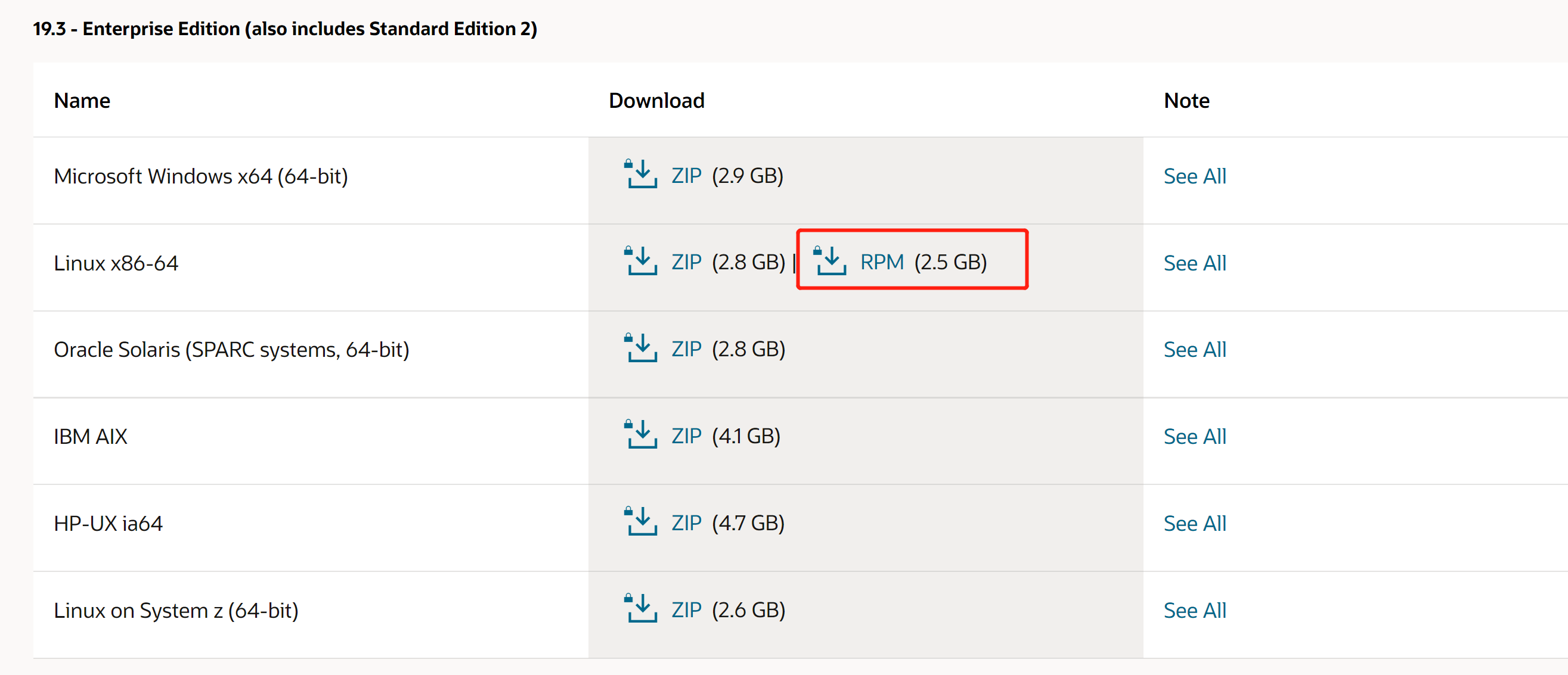
Note:Oracle Linux为红帽二次开发,对Oracle数据库极为友好,可以在交付云下载,https://edelivery.oracle.com/;RPM包在官网下载即可。
修改主机名
[root@fwl-node01 ~]# vi /etc/hostname
fwl-node01
修改host文件
[root@fwl-node01 ~]# vi /etc/hosts

192.168.36.100 fwl-node01
禁用selinux
[root@fwl-node01 ~]# vi /etc/selinux/config
...
SELINUX=disabled
...
Note:需要重启操作系统
关闭防火墙
[root@fwl-node01 ~]# systemctl stop firewalld.service
[root@fwl-node01 ~]# systemctl disable firewalld.service
禁用虚拟网卡
[root@fwl-node01 ~]# systemctl stop libvirtd
[root@fwl-node01 ~]# systemctl disable libvirtd
Note:针对虚拟机
配置YUM源
[root@fwl-node01 ~]# mount /dev/sr0 /mnt
[root@fwl-node01 ~]# cd /etc/yum.repos.d/
[root@fwl-node01 ~]# vi oel8.repo

[BaseOS]
name=Oracle Enterprise Linux 8 - BaseOS
metadata_expire=-1
gpgcheck=0
enabled=1
baseurl=file:///mnt/BaseOS/

[AppStream]
name=Oracle Enterprise Linux 8 - AppStream
metadata_expire=-1
gpgcheck=0
enabled=1
baseurl=file:///mnt/AppStream/
[root@fwl-node01 ~]# dnf group list
Last metadata expiration check: 2:52:41 ago on Fri 25 Jun 2021 05:55:58 AM CST.
Available Environment Groups:
   Server
   Minimal Install
   Workstation
   Custom Operating System
   Virtualization Host
Installed Environment Groups:
   Server with GUI
Installed Groups:
   Container Management
   Headless Management
Available Groups:
   Legacy UNIX Compatibility
   Development Tools
   .NET Core Development
   Graphical Administration Tools
   Network Servers
   RPM Development Tools
   Scientific Support
   Security Tools
   Smart Card Support
   System Tools
[root@fwl-node01 ~]#
Note:linux8 yum源有所改变
安装数据库软件
检查
[root@fwl-node01 ~]# ll
total 2631520
-rw-------. 1 root root       1468 Jun 24 20:19 anaconda-ks.cfg
-rw-r--r--. 1 root root       1819 Jun 24 20:24 initial-setup-ks.cfg
-rw-r--r--  1 root root 2694664264 Jun 24 22:00 oracle-database-ee-19c-1.0-1.x86_64.rpm
[root@fwl-node01 ~]# dnf list | grep oracle-database
oracle-database-preinstall-19c.x86_64                  1.0-2.el8                                          AppStream
[root@fwl-node01 ~]#
Note:需要用到oracle-database-preinstall-19c预安装包,Oracle linux会自带,下面RPM包安装数据库会自动安装此预安装包。
安装
[root@fwl-node01 ~]# dnf install oracle-database-ee-19c-1.0-1.x86_64.rpm

Last metadata expiration check: 0:09:45 ago on Thu 24 Jun 2021 11:59:12 PM CST.
Dependencies resolved.
==============================================================================================================================================
 Package                                     Architecture        Version                                      Repository                 Size
==============================================================================================================================================
Installing:
 oracle-database-ee-19c                      x86_64              1.0-1                                        @commandline              2.5 G
Installing dependencies:
 glibc-devel                                 x86_64              2.28-151.0.1.el8                             BaseOS                    1.0 M
 ksh                                         x86_64              20120801-254.0.1.el8                         AppStream                 927 k
 libaio-devel                                x86_64              0.3.112-1.el8                                BaseOS                     19 k
 libnsl                                      x86_64              2.28-151.0.1.el8                             BaseOS                    102 k
 libstdc++-devel                             x86_64              8.4.1-1.0.1.el8                              AppStream                 2.1 M
 libxcrypt-devel                             x86_64              4.1.1-4.el8                                  BaseOS                     25 k
 lm_sensors-libs                             x86_64              3.4.0-22.20180522git70f7e08.el8              BaseOS                     59 k
 make                                        x86_64              1:4.2.1-10.el8                               BaseOS                    498 k
 oracle-database-preinstall-19c              x86_64              1.0-2.el8                                    AppStream                  31 k
 sysstat                                     x86_64              11.7.3-5.el8                                 AppStream                 425 k

Transaction Summary
==============================================================================================================================================
Install  11 Packages

Total size: 2.5 G
Installed size: 6.9 G
Is this ok [y/N]: y
Downloading Packages:
Running transaction check
Transaction check succeeded.
Running transaction test
Transaction test succeeded.
Running transaction
  Preparing        :                                                                                                                      1/1
  Installing       : libxcrypt-devel-4.1.1-4.el8.x86_64                                                                                  1/11
  Installing       : glibc-devel-2.28-151.0.1.el8.x86_64                                                                                 2/11
  Running scriptlet: glibc-devel-2.28-151.0.1.el8.x86_64                                                                                 2/11
  Installing       : libstdc++-devel-8.4.1-1.0.1.el8.x86_64                                                                              3/11
  Installing       : ksh-20120801-254.0.1.el8.x86_64                                                                                     4/11
  Running scriptlet: ksh-20120801-254.0.1.el8.x86_64                                                                                     4/11
  Installing       : make-1:4.2.1-10.el8.x86_64                                                                                          5/11
  Running scriptlet: make-1:4.2.1-10.el8.x86_64                                                                                          5/11
  Installing       : lm_sensors-libs-3.4.0-22.20180522git70f7e08.el8.x86_64                                                              6/11
  Running scriptlet: lm_sensors-libs-3.4.0-22.20180522git70f7e08.el8.x86_64                                                              6/11
/sbin/ldconfig: /etc/ld.so.conf.d/kernel-5.4.17-2102.201.3.el8uek.x86_64.conf:6: hwcap directive ignored

  Installing       : sysstat-11.7.3-5.el8.x86_64                                                                                         7/11
  Running scriptlet: sysstat-11.7.3-5.el8.x86_64                                                                                         7/11
  Installing       : libnsl-2.28-151.0.1.el8.x86_64                                                                                      8/11
  Installing       : libaio-devel-0.3.112-1.el8.x86_64                                                                                   9/11
  Running scriptlet: oracle-database-preinstall-19c-1.0-2.el8.x86_64                                                                    10/11
  Installing       : oracle-database-preinstall-19c-1.0-2.el8.x86_64                                                                    10/11
  Running scriptlet: oracle-database-ee-19c-1.0-1.x86_64                                                                                11/11
  Installing       : oracle-database-ee-19c-1.0-1.x86_64                                                                                11/11
  Running scriptlet: oracle-database-ee-19c-1.0-1.x86_64                                                                                11/11
[INFO] Executing post installation scripts...
[INFO] Oracle home installed successfully and ready to be configured.
To configure a sample Oracle Database you can execute the following service configuration script as root: /etc/init.d/oracledb_ORCLCDB-19c configure

  Running scriptlet: oracle-database-preinstall-19c-1.0-2.el8.x86_64                                                                    11/11
  Running scriptlet: oracle-database-ee-19c-1.0-1.x86_64                                                                                11/11
/sbin/ldconfig: /etc/ld.so.conf.d/kernel-5.4.17-2102.201.3.el8uek.x86_64.conf:6: hwcap directive ignored

  Verifying        : glibc-devel-2.28-151.0.1.el8.x86_64                                                                                 1/11
  Verifying        : libaio-devel-0.3.112-1.el8.x86_64                                                                                   2/11
  Verifying        : libnsl-2.28-151.0.1.el8.x86_64                                                                                      3/11
  Verifying        : libxcrypt-devel-4.1.1-4.el8.x86_64                                                                                  4/11
  Verifying        : lm_sensors-libs-3.4.0-22.20180522git70f7e08.el8.x86_64                                                              5/11
  Verifying        : make-1:4.2.1-10.el8.x86_64                                                                                          6/11
  Verifying        : ksh-20120801-254.0.1.el8.x86_64                                                                                     7/11
  Verifying        : libstdc++-devel-8.4.1-1.0.1.el8.x86_64                                                                              8/11
  Verifying        : oracle-database-preinstall-19c-1.0-2.el8.x86_64                                                                     9/11
  Verifying        : sysstat-11.7.3-5.el8.x86_64                                                                                        10/11
  Verifying        : oracle-database-ee-19c-1.0-1.x86_64                                                                                11/11

Installed:
  glibc-devel-2.28-151.0.1.el8.x86_64                       ksh-20120801-254.0.1.el8.x86_64           libaio-devel-0.3.112-1.el8.x86_64
  libnsl-2.28-151.0.1.el8.x86_64                            libstdc++-devel-8.4.1-1.0.1.el8.x86_64    libxcrypt-devel-4.1.1-4.el8.x86_64
  lm_sensors-libs-3.4.0-22.20180522git70f7e08.el8.x86_64    make-1:4.2.1-10.el8.x86_64                oracle-database-ee-19c-1.0-1.x86_64
  oracle-database-preinstall-19c-1.0-2.el8.x86_64           sysstat-11.7.3-5.el8.x86_64

Complete!
Note:安装目录在/opt/oracle
配置数据库
直接root执行脚本即可
[root@fwl-node01 sysconfig]# /etc/init.d/oracledb_ORCLCDB-19c configure
Note:可以自行编辑脚本,修改dbname、字符集等,之后要修改此文件名/etc/sysconfig/oracledb_ORCLCDB-19c.conf
Configuring Oracle Database fwlcdb.
Prepare for db operation
8% complete
Copying database files
31% complete
Creating and starting Oracle instance
32% complete
36% complete
40% complete
43% complete
46% complete
Completing Database Creation
51% complete
54% complete
Creating Pluggable Databases
58% complete
77% complete
Executing Post Configuration Actions
100% complete
Database creation complete. For details check the logfiles at:
 /opt/oracle/cfgtoollogs/dbca/fwlcdb.
Database Information:
Global Database Name:fwlcdb
System Identifier(SID):fwlcdb
Look at the log file "/opt/oracle/cfgtoollogs/dbca/fwlcdb/fwlcdb.log" for further details.

Database configuration completed successfully. The passwords were auto generated, you must change them by connecting to the database using 'sqlplus / as sysdba' as the oracle user.
检查
[root@fwl-node01 sysconfig]# ps -ef | grep pmon
oracle     41412       1  0 00:45 ?        00:00:00 ora_pmon_fwlcdb
root       41852    1548  0 00:46 pts/0    00:00:00 grep --color=auto pmon

[root@fwl-node01 sysconfig]# su - oracle
[oracle@fwl-node01 ~]$ . oraenv
ORACLE_SID = [oracle] ? fwlcdb
The Oracle base has been set to /opt/oracle
[oracle@fwl-node01 ~]$
[oracle@fwl-node01 ~]$
[oracle@fwl-node01 ~]$ sqlplus / as sysdba

SQL*Plus: Release 19.0.0.0.0 - Production on Fri Jun 25 00:47:15 2021
Version 19.3.0.0.0

Copyright (c) 1982, 2019, Oracle.  All rights reserved.


Connected to:
Oracle Database 19c Enterprise Edition Release 19.0.0.0.0 - Production
Version 19.3.0.0.0

SQL>
SQL>
SQL> show pdbs;

    CON_ID CON_NAME			  OPEN MODE  RESTRICTED
---------- ------------------------------ ---------- ----------
	 2 PDB$SEED			  READ ONLY  NO
	 3 PDB1 			  READ WRITE NO
最后修改时间:2021-06-25 09:11:03
「喜欢这篇文章,您的关注和赞赏是给作者最好的鼓励」
关注作者
【版权声明】本文为墨天轮用户原创内容,转载时必须标注文章的来源(墨天轮),文章链接,文章作者等基本信息,否则作者和墨天轮有权追究责任。如果您发现墨天轮中有涉嫌抄袭或者侵权的内容,欢迎发送邮件至:contact@modb.pro进行举报,并提供相关证据,一经查实,墨天轮将立刻删除相关内容。
