



目录
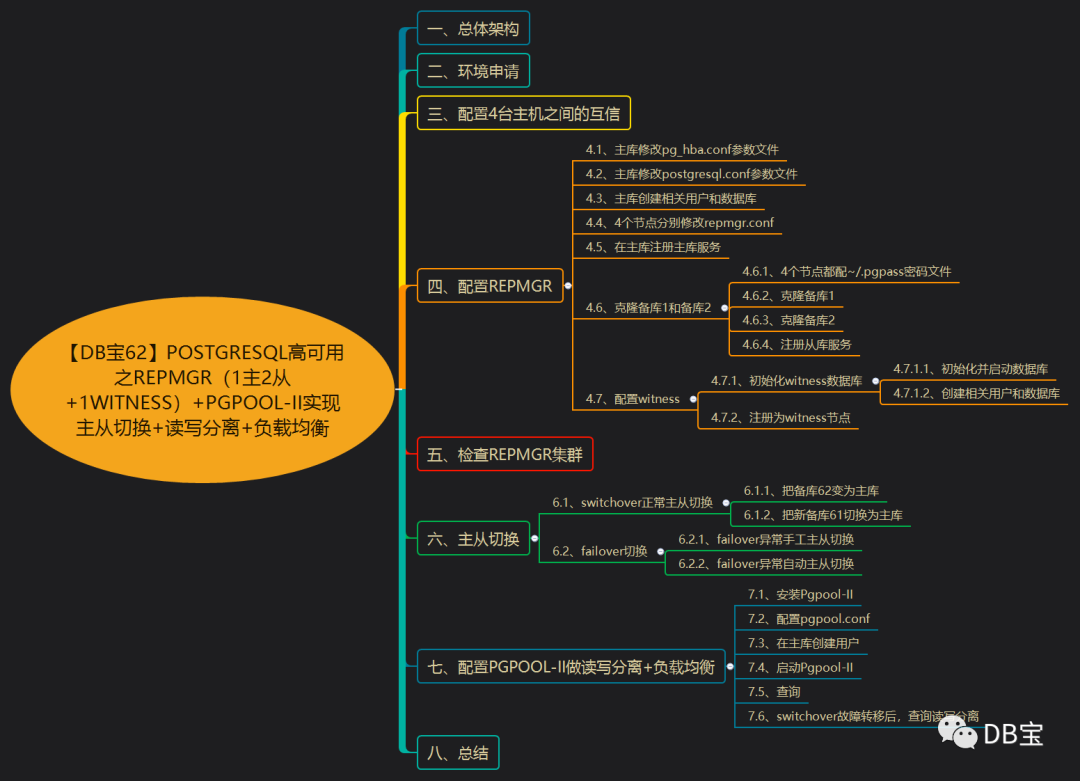
一、总体架构二、环境申请三、配置4台主机之间的互信四、配置repmgr4.1、主库修改pg_hba.conf参数文件4.2、主库修改postgresql.conf参数文件4.3、主库创建相关用户和数据库4.4、4个节点分别修改repmgr.conf4.5、在主库注册主库服务4.6、克隆备库1和备库24.6.1、4个节点都配~/.pgpass密码文件4.6.2、克隆备库14.6.3、克隆备库24.6.4、注册从库服务4.7、配置witness4.7.1、初始化witness数据库4.7.1.1、初始化并启动数据库4.7.1.2、创建相关用户和数据库4.7.2、注册为witness节点五、检查repmgr集群六、主从切换6.1、switchover正常主从切换6.1.1、把备库62变为主库6.1.2、把新备库61切换为主库6.2、failover切换6.2.1、failover异常手工主从切换6.2.2、failover异常自动主从切换七、配置Pgpool-II做读写分离+负载均衡7.1、安装Pgpool-II7.2、配置pgpool.conf7.3、在主库创建用户7.4、启动Pgpool-II7.5、查询7.6、switchover故障转移后,查询读写分离八、总结
一、总体架构
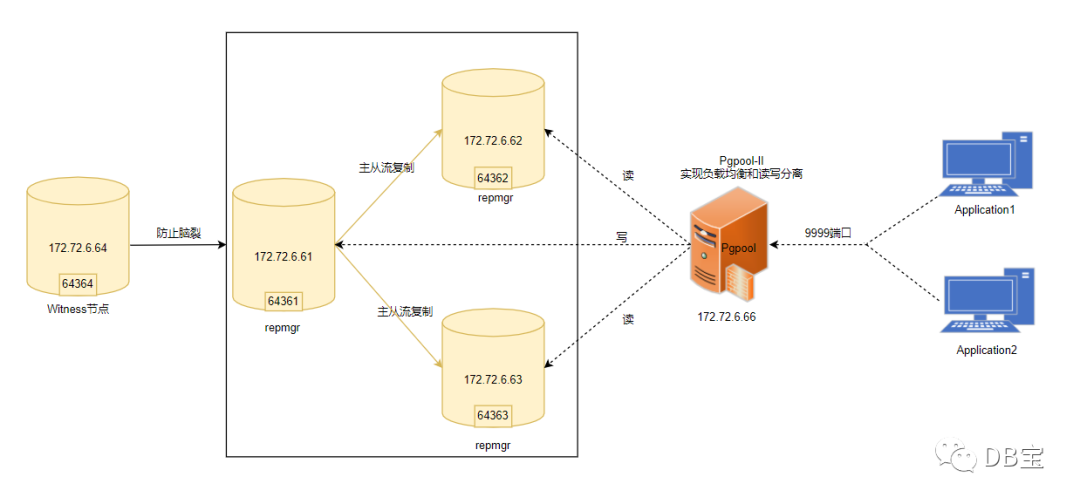
本文最终需要实现的目标:
1、1主2从流复制
2、读写分离+负载均衡(pgpool-II)
3、主从自动切换(repmgr)

所有的节点:安装操作系统、创建PG用户目录、安装PG软件、安装repmgr
主库:只初始化主库、启动主库归档
二、环境申请
先申请4台机器,6.66节点最后再申请,反正docker容器都是即开即用的。
 1-- 主库
 2docker rm -f lhrrepmgr64361
 3docker run -d --name lhrrepmgr64361 -h lhrrepmgr64361 \
 4  --net=pg-network --ip 172.72.6.61 \
 5  -p 64361:5432  \
 6  -v /sys/fs/cgroup:/sys/fs/cgroup \
 7  --privileged=true lhrbest/lhrpgall:1.0 \
 8  /usr/sbin/init
 9
10docker network connect bridge lhrrepmgr64361
11
12
13-- 从库1
14docker rm -f lhrrepmgr64362
15docker run -d --name lhrrepmgr64362 -h lhrrepmgr64362 \
16  --net=pg-network --ip 172.72.6.62 \
17  -p 64362:5432  \
18  -v /sys/fs/cgroup:/sys/fs/cgroup \
19  --privileged=true lhrbest/lhrpgall:1.0 \
20  /usr/sbin/init
21
22docker network connect bridge lhrrepmgr64362
23
24
25
26
27-- 从库2
28docker rm -f lhrrepmgr64363
29docker run -d --name lhrrepmgr64363 -h lhrrepmgr64363 \
30  --net=pg-network --ip 172.72.6.63 \
31  -p 64363:5432  \
32  -v /sys/fs/cgroup:/sys/fs/cgroup \
33  --privileged=true lhrbest/lhrpgall:1.0 \
34  /usr/sbin/init
35
36docker network connect bridge lhrrepmgr64363
37
38
39
40-- Witness库
41docker rm -f lhrrepmgr64364
42docker run -d --name lhrrepmgr64364 -h lhrrepmgr64364 \
43  --net=pg-network --ip 172.72.6.64 \
44  -p 64364:5432  \
45  -v /sys/fs/cgroup:/sys/fs/cgroup \
46  --privileged=true lhrbest/lhrpgall:1.0 \
47  /usr/sbin/init
48
49docker network connect bridge lhrrepmgr64364
50
51
52
53-- 重启4台机器
54docker restart lhrrepmgr64361 lhrrepmgr64362 lhrrepmgr64363 lhrrepmgr64364
55
56
57[root@docker35 ~]# docker ps | grep repmgr
5831d3d31c1073        lhrbest/lhrpgall:1.0                       "/usr/sbin/init"         41 hours ago        Up 41 hours         5433-5435/tcp, 0.0.0.0:64364->5432/tcp                                                               lhrrepmgr64364
59572d4ea2c072        lhrbest/lhrpgall:1.0                       "/usr/sbin/init"         41 hours ago        Up 41 hours         5433-5435/tcp, 0.0.0.0:64363->5432/tcp                                                               lhrrepmgr64363
606ded416b2016        lhrbest/lhrpgall:1.0                       "/usr/sbin/init"         41 hours ago        Up 41 hours         5433-5435/tcp, 0.0.0.0:64362->5432/tcp                                                               lhrrepmgr64362
61fa38b58b8f3d        lhrbest/lhrpgall:1.0                       "/usr/sbin/init"         41 hours ago        Up 41 hours         5433-5435/tcp, 0.0.0.0:64361->5432/tcp                                                               lhrrepmgr64361
62[root@docker35 ~]#
👉 注意:
1、镜像lhrbest/lhrpgall:1.0中,申请的4台主机均已安装好PG 13和repmgr软件
2、PG安装方式为编译安装,数据库已初始化完成,用户为pg13
3、该镜像里已安装了PG13、PG12、PG11、PG10和PG9.6这几个版本,均为编译安装,本文使用PG13来操作
三、配置4台主机之间的互信
1-- 只在主库61节点上,以root用户执行:
2chmod +x sshUserSetup.sh
3./sshUserSetup.sh -user pg13  -hosts "172.72.6.61 172.72.6.62 172.72.6.63 172.72.6.64" -advanced exverify -confirm
4
5-- 在每台主机修改权限,否则报错:Bad owner or permissions on home/pg13/.ssh/config
6chmod 600 /home/pg13/.ssh/config
依次输入:yes,回车和密码即可。
脚本下载:https://share.weiyun.com/57HUxNi
验证:
1ssh pg13@lhrrepmgr64361 date
2ssh pg13@lhrrepmgr64362 date
3ssh pg13@lhrrepmgr64363 date
4ssh pg13@lhrrepmgr64364 date
第二次执行时不再提示输入yes,并且可以成功执行命令,则表示SSH对等性配置成功。
执行过程:
1[pg13@lhrrepmgr64361 /]# ssh pg13@lhrrepmgr64362 date
2Tue Apr 27 17:15:04 CST 2021
3[root@lhrrepmgr64361 /]#
4[pg13@lhrrepmgr64361 /]# ssh pg13@lhrrepmgr64363 date
5Tue Apr 27 17:15:08 CST 2021
6[root@lhrrepmgr64361 /]#
7[pg13@lhrrepmgr64361 /]# ssh pg13@lhrrepmgr64364 date
8Tue Apr 27 17:15:13 CST 2021
9[pg13@lhrrepmgr64361 /]#
四、配置repmgr
4.1、主库修改pg_hba.conf参数文件
 1-- 进入主库
 2docker exec -it lhrrepmgr64361 bash
 3
 4su - pg13
 5
 6cat >> /pg13/pgdata/pg_hba.conf <<"EOF"
 7
 8local repmgr repmgr md5
 9host repmgr repmgr 127.0.0.1/32 md5
10host repmgr repmgr 172.72.6.0/24 md5
11
12local replication repmgr md5
13host replication repmgr 127.0.0.1/32 md5
14host replication repmgr 172.72.6.0/24 md5
15
16EOF
4.2、主库修改postgresql.conf参数文件
 1-- 修改参数
 2cat >> /pg13/pgdata/postgresql.conf <<"EOF"
 3
 4# 归档参数
 5wal_level='replica'
 6archive_mode='on'
 7archive_command='test ! -f /pg13/archive/%f && cp %p /pg13/archive/%f'
 8restore_command='cp /pg13/archive/%f %p'
 9
10# 主从流复制
11hot_standby=on
12max_wal_senders=10
13wal_sender_timeout=60s
14wal_keep_size=16MB
15
16# 主从切换参数,启用PG数据库的复制槽,PG12不需要"use_replication_slots=true"这个参数了。
17max_replication_slots=10
18wal_log_hints=on
19
20# 自动切换
21shared_preload_libraries ='repmgr'
22
23EOF
24
25
26-- 重启
27pg_ctl start
28
29-- 查询
30psql -U postgres -h 192.168.66.35 -p 64361
31select * from pg_settings where name in ('wal_level','archive_mode','archive_command');
32
33
34-- 切换归档
35select pg_switch_wal();
4.3、主库创建相关用户和数据库
1-- 创建相关用户和数据库
2su - pg13
3createuser -s repmgr
4createdb repmgr -O repmgr
5
6psql -h 127.0.0.1 -c "alter user repmgr with password 'lhr';"
7psql -h 127.0.0.1 -c "alter user repmgr set search_path to repmgr, \"\$user\",public;"
结果:
 1[root@lhrrepmgr64361 /]# systemctl start pg13
 2[root@lhrrepmgr64361 /]# systemctl status pg13
 3● pg13.service - PostgreSQL database server
 4   Loaded: loaded (/etc/systemd/system/pg13.service; disabled; vendor preset: disabled)
 5   Active: active (running) since Tue 2021-04-27 16:25:24 CST; 6s ago
 6     Docs: man:postgres(1)
 7  Process: 769 ExecStart=/pg13/pg13/bin/pg_ctl start -D ${PGDATA} -s -o -p ${PGPORT} -w -t 300 (code=exited, status=0/SUCCESS)
 8 Main PID: 771 (postgres)
 9   CGroup: /docker/a777ef12d5ff83a9d47be51a98531bd45b42d2b008f7a25f894f3244ce9cc0d4/system.slice/pg13.service
10           ├─771 /pg13/pg13/bin/postgres -D /pg13/pgdata -p 5432
11           ├─772 postgres: logger
12           ├─774 postgres: checkpointer
13           ├─775 postgres: background writer
14           ├─776 postgres: walwriter
15           ├─777 postgres: autovacuum launcher
16           ├─778 postgres: stats collector
17           └─779 postgres: logical replication launcher
18
19Apr 27 16:25:23 lhrrepmgr64361 systemd[1]: Starting PostgreSQL database server...
20Apr 27 16:25:24 lhrrepmgr64361 pg_ctl[769]: 2021-04-27 16:25:24.024 CST [771] LOG:  redirecting log output to logging collector process
21Apr 27 16:25:24 lhrrepmgr64361 pg_ctl[769]: 2021-04-27 16:25:24.024 CST [771] HINT:  Future log output will appear in directory "pg_log".
22Apr 27 16:25:24 lhrrepmgr64361 systemd[1]: Started PostgreSQL database server.
23
24[root@lhrrepmgr64361 /]# su - pg13
25Last login: Tue Apr 27 16:24:50 CST 2021 on pts/0
26[pg13@lhrrepmgr64361 ~]$
27[pg13@lhrrepmgr64361 ~]$ createuser -s repmgr
28[pg13@lhrrepmgr64361 ~]$
29[pg13@lhrrepmgr64361 ~]$ createdb repmgr -O repmgr
30[pg13@lhrrepmgr64361 ~]$
31[pg13@lhrrepmgr64361 ~]$ psql -h 127.0.0.1 -c "alter user repmgr with password 'lhr'"
32ALTER ROLE
33[pg13@lhrrepmgr64361 ~]$
34[pg13@lhrrepmgr64361 ~]$ psql -h 127.0.0.1 -c "alter user repmgr set search_path to repmgr, \"\$user\",public";
35ALTER ROLE
36
37
38C:\Users\lhrxxt>psql -U postgres -h 192.168.66.35 -p 64361
39Password for user postgres:
40psql (13.2)
41Type "help" for help.
42
43postgres=# \du
44                                   List of roles
45 Role name |                         Attributes                         | Member of
46-----------+------------------------------------------------------------+-----------
47 postgres  | Superuser, Create role, Create DB, Replication, Bypass RLS | {}
48 repmgr    | Superuser, Create role, Create DB                          | {}
49
50
51postgres=# \l
52                                 List of databases
53   Name    |  Owner   | Encoding |  Collate   |   Ctype    |   Access privileges
54-----------+----------+----------+------------+------------+-----------------------
55 postgres  | postgres | UTF8     | en_US.utf8 | en_US.utf8 |
56 repmgr    | repmgr   | UTF8     | en_US.utf8 | en_US.utf8 |
57 template0 | postgres | UTF8     | en_US.utf8 | en_US.utf8 | =c/postgres          +
58           |          |          |            |            | postgres=CTc/postgres
59 template1 | postgres | UTF8     | en_US.utf8 | en_US.utf8 | =c/postgres          +
60           |          |          |            |            | postgres=CTc/postgres
61(4 rows)
4.4、4个节点分别修改repmgr.conf
 1-- 以pg13用户修改
 2su - pg13
 3
 4-- 主库
 5cat > /pg13/pg13/repmgr.conf << "EOF"
 6node_id=1
 7node_name=lhrrepmgr64361
 8conninfo='host=172.72.6.61 user=repmgr password=lhr dbname=repmgr connect_timeout=2'
 9data_directory='/pg13/pgdata'
10pg_bindir='/pg13/pg13/bin'
11EOF
12
13
14-- 从库1
15cat > /pg13/pg13/repmgr.conf << "EOF"
16node_id=2
17node_name=lhrrepmgr64362
18conninfo='host=172.72.6.62 user=repmgr password=lhr dbname=repmgr connect_timeout=2'
19data_directory='/pg13/pgdata'
20pg_bindir='/pg13/pg13/bin'
21EOF
22
23-- 从库2
24cat > /pg13/pg13/repmgr.conf << "EOF"
25node_id=3
26node_name=lhrrepmgr64363
27conninfo='host=172.72.6.63 user=repmgr password=lhr dbname=repmgr connect_timeout=2'
28data_directory='/pg13/pgdata'
29pg_bindir='/pg13/pg13/bin'
30EOF
31
32
33-- witness节点
34cat > /pg13/pg13/repmgr.conf << "EOF"
35node_id=4
36node_name=lhrrepmgr64364
37conninfo='host=172.72.6.64 user=repmgr password=lhr dbname=repmgr connect_timeout=2'
38data_directory='/pg13/pgdata'
39pg_bindir='/pg13/pg13/bin'
40EOF
41
42
43
44
45-- 测试
46psql 'host=172.72.6.61 user=repmgr password=lhr dbname=repmgr connect_timeout=2'
47psql 'host=172.72.6.62 user=repmgr password=lhr dbname=repmgr connect_timeout=2'
48psql 'host=172.72.6.63 user=repmgr password=lhr dbname=repmgr connect_timeout=2'
49psql 'host=172.72.6.64 user=repmgr password=lhr dbname=repmgr connect_timeout=2'
4.5、在主库注册主库服务
1-- 注册服务
2repmgr -f /pg13/pg13/repmgr.conf primary register
3
4-- 查询
5repmgr -f /pg13/pg13/repmgr.conf cluster show
6psql -U repmgr -h 192.168.66.35 -p 64361 -d repmgr
执行过程:
 1[pg13@lhrrepmgr64361 pg13]$ repmgr -f /pg13/pg13/repmgr.conf primary register
 2INFO: connecting to primary database...
 3NOTICE: attempting to install extension "repmgr"
 4NOTICE: "repmgr" extension successfully installed
 5NOTICE: primary node record (ID: 1) registered
 6[pg13@lhrrepmgr64361 pg13]$
 7[pg13@lhrrepmgr64361 pg13]$ repmgr -f /pg13/pg13/repmgr.conf cluster show
 8 ID | Name           | Role    | Status    | Upstream | Location | Priority | Timeline | Connection string
 9----+----------------+---------+-----------+----------+----------+----------+----------+---------------------------------------------------------------------------
10 1  | lhrrepmgr64361 | primary | * running |          | default  | 100      | 1        | host=172.72.6.61 user=repmgr password=lhr dbname=repmgr connect_timeout=2
11
12
13C:\Users\lhrxxt>psql -U repmgr -h 192.168.66.35 -p 64361 -d repmgr
14Password for user repmgr:
15psql (13.2)
16Type "help" for help.
17
18repmgr=# select * from repmgr.nodes;
19 node_id | upstream_node_id | active |   node_name    |  type   | location | priority |                                 conninfo                                  | repluser | slot_name |      config_file
20---------+------------------+--------+----------------+---------+----------+----------+---------------------------------------------------------------------------+----------+-----------+------------------------
21       1 |                  | t      | lhrrepmgr64361 | primary | default  |      100 | host=172.72.6.61 user=repmgr password=lhr dbname=repmgr connect_timeout=2 | repmgr   |           | /pg13/pg13/repmgr.conf
22(1 row)
4.6、克隆备库1和备库2
4.6.1、4个节点都配~/.pgpass密码文件
 1su - pg13
 2echo "*:*:*:repmgr:lhr" > ~/.pgpass
 3chmod 0600 ~/.pgpass
 4
 5
 6
 7-- 测试,若不需要密码,那就证明配置正确
 8psql 'host=172.72.6.61 user=repmgr dbname=repmgr connect_timeout=2'
 9psql 'host=172.72.6.62 user=repmgr dbname=repmgr connect_timeout=2'
10psql 'host=172.72.6.63 user=repmgr dbname=repmgr connect_timeout=2'
11psql 'host=172.72.6.64 user=repmgr dbname=repmgr connect_timeout=2'
4.6.2、克隆备库1
 1-- 其中--dry-run表示不真实执行克隆过程,只是检查是否有问题
 2repmgr -h 172.72.6.61 -U repmgr -d repmgr -f /pg13/pg13/repmgr.conf standby clone --force --dry-run
 3
 4-- 执行克隆命令,其实还是调用pg_basebackup
 5repmgr -h 172.72.6.61 -U repmgr -d repmgr -f /pg13/pg13/repmgr.conf standby clone --force
 6
 7
 8-- 启动
 9pg_ctl -D /pg13/pgdata start
10
11-- 查询
12psql
13select * from pg_stat_wal_receiver;
执行过程:
 1[pg13@lhrrepmgr64362 ~]$ repmgr -h 172.72.6.61 -U repmgr -d repmgr -f /pg13/pg13/repmgr.conf standby clone --force --dry-run
 2NOTICE: destination directory "/pg13/pgdata" provided
 3INFO: connecting to source node
 4DETAIL: connection string is: host=172.72.6.61 user=repmgr dbname=repmgr
 5DETAIL: current installation size is 29 MB
 6INFO: "repmgr" extension is installed in database "repmgr"
 7WARNING: target data directory appears to be a PostgreSQL data directory
 8DETAIL: target data directory is "/pg13/pgdata"
 9HINT: use -F/--force to overwrite the existing data directory
10INFO: replication slot usage not requested;  no replication slot will be set up for this standby
11INFO: parameter "max_wal_senders" set to 10
12NOTICE: checking for available walsenders on the source node (2 required)
13INFO: sufficient walsenders available on the source node
14DETAIL: 2 required, 10 available
15NOTICE: checking replication connections can be made to the source server (2 required)
16INFO: required number of replication connections could be made to the source server
17DETAIL: 2 replication connections required
18WARNING: data checksums are not enabled and "wal_log_hints" is "off"
19DETAIL: pg_rewind requires "wal_log_hints" to be enabled
20NOTICE: standby will attach to upstream node 1
21HINT: consider using the -c/--fast-checkpoint option
22INFO: all prerequisites for "standby clone" are met
23[pg13@lhrrepmgr64362 ~]$ repmgrrepmgr -h 172.72.6.61 -U repmgr -d repmgr -f /pg13/pg13/repmgr.conf standby clone^C
24[pg13@lhrrepmgr64362 ~]$ repmgr -h 172.72.6.61 -U repmgr -d repmgr -f /pg13/pg13/repmgr.conf standby clone
25NOTICE: destination directory "/pg13/pgdata" provided
26INFO: connecting to source node
27DETAIL: connection string is: host=172.72.6.61 user=repmgr dbname=repmgr
28DETAIL: current installation size is 29 MB
29ERROR: target data directory appears to be a PostgreSQL data directory
30DETAIL: target data directory is "/pg13/pgdata"
31HINT: use -F/--force to overwrite the existing data directory
32[pg13@lhrrepmgr64362 ~]$ repmgr -h 172.72.6.61 -U repmgr -d repmgr -f /pg13/pg13/repmgr.conf standby clone --force
33NOTICE: destination directory "/pg13/pgdata" provided
34INFO: connecting to source node
35DETAIL: connection string is: host=172.72.6.61 user=repmgr dbname=repmgr
36DETAIL: current installation size is 29 MB
37INFO: replication slot usage not requested;  no replication slot will be set up for this standby
38NOTICE: checking for available walsenders on the source node (2 required)
39NOTICE: checking replication connections can be made to the source server (2 required)
40WARNING: data checksums are not enabled and "wal_log_hints" is "off"
41DETAIL: pg_rewind requires "wal_log_hints" to be enabled
42WARNING: directory "/pg13/pgdata" exists but is not empty
43NOTICE: -F/--force provided - deleting existing data directory "/pg13/pgdata"
44NOTICE: starting backup (using pg_basebackup)...
45HINT: this may take some time; consider using the -c/--fast-checkpoint option
46INFO: executing:
47  /pg13/pg13/bin/pg_basebackup -l "repmgr base backup"  -D /pg13/pgdata -h 172.72.6.61 -p 5432 -U repmgr -X stream
48Password:
49WARNING:  skipping special file "./.s.PGSQL.5432"
50WARNING:  skipping special file "./.s.PGSQL.5432"
51NOTICE: standby clone (using pg_basebackup) complete
52NOTICE: you can now start your PostgreSQL server
53HINT: for example: pg_ctl -D /pg13/pgdata start
54HINT: after starting the server, you need to register this standby with "repmgr standby register"
55
56[pg13@lhrrepmgr64362 ~]$ pg_ctl -D /pg13/pgdata start
57waiting for server to start....2021-04-27 19:14:08.750 CST [9298] LOG:  redirecting log output to logging collector process
582021-04-27 19:14:08.750 CST [9298] HINT:  Future log output will appear in directory "pg_log".
59 done
60server started
61
62[pg13@lhrrepmgr64362 ~]$ psql
63psql (13.2)
64Type "help" for help.
65
66
67postgres=# select * from pg_stat_wal_receiver;
68 pid  |  status   | receive_start_lsn | receive_start_tli | written_lsn | flushed_lsn | received_tli |      last_msg_send_time       |     last_msg_receipt_time     | latest_end_lsn |        latest_end_time        | slot_name | sender_host | sender_port |                                                                                                                                                           conninfo
69------+-----------+-------------------+-------------------+-------------+-------------+--------------+-------------------------------+-------------------------------+----------------+-------------------------------+-----------+-------------+-------------+-------------------------------------------------------------------------------------------------------------------------------------------------------------------------------------------------------------------------------------------------------------------------------------------------------------------------------
70 9304 | streaming | 0/3000000         |                 1 | 0/30001F0   | 0/30001F0   |            1 | 2021-04-27 19:15:08.862599+08 | 2021-04-27 19:15:08.862719+08 | 0/30001F0      | 2021-04-27 19:14:08.830865+08 |           | 172.72.6.61 |        5432 | user=repmgr password=******** channel_binding=disable connect_timeout=2 dbname=replication host=172.72.6.61 port=5432 application_name=lhrrepmgr64362 fallback_application_name=walreceiver sslmode=disable sslcompression=0 ssl_min_protocol_version=TLSv1.2 gssencmode=disable krbsrvname=postgres target_session_attrs=any
71(1 row)
72
信息“NOTICE: standby clone (using pg_basebackup) complete”表示测试完成。
4.6.3、克隆备库2
文章转载自DB宝,如果涉嫌侵权,请发送邮件至:contact@modb.pro进行举报,并提供相关证据,一经查实,墨天轮将立刻删除相关内容。
