



作者
digoal
日期
2016-07-15
标签
PostgreSQL , offset , limit , 质变
背景
offset limit是一个多么常见的需求啊,但是你知道offset的数据可能隐藏着质变吗?
如图
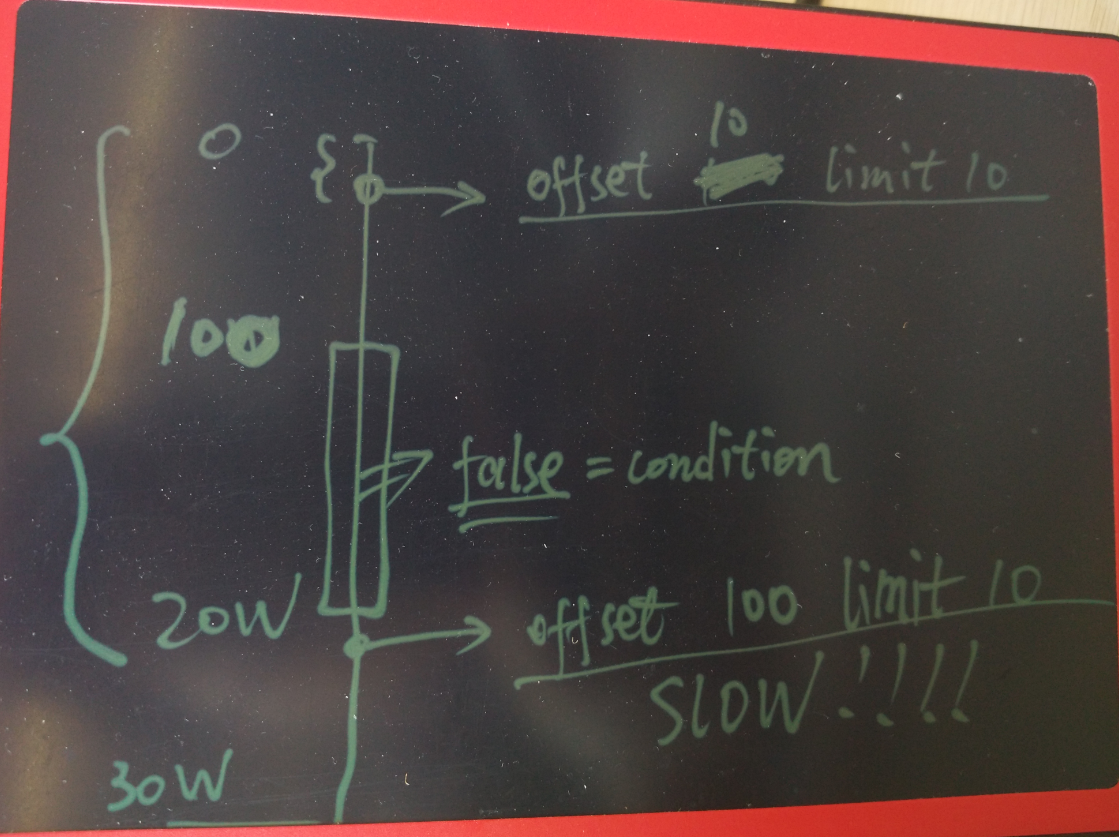
node有30W条数据,其中前100条是满足条件的,然后100条到20W条都是不满足条件的。
所以offset 10 limit 10非常的快。
但是offset 100 limit 10,就要扫描从100到20W条记录,然后再往后才是满足条件的记录。
这就是质变的原因。
例子
生成1000万测试记录。
postgres=# create table tbl(id int primary key, info text);
CREATE TABLE
postgres=# insert into tbl select generate_series(1,10000000),'';
INSERT 0 10000000
更新info字段的数据,分布在前1000条和第500万后的100条。
postgres=# update tbl set info='test' where id<1000 or id between 5000000 and 5000100;
UPDATE 1100
order by id offset 100 limit 100查询的是前面的记录,非常快。
```
postgres=# explain (analyze,verbose,timing,costs,buffers) select * from tbl where info='test' order by id offset 100 limit 100;
QUERY PLAN
Limit (cost=49339.42..98678.40 rows=100 width=5) (actual time=0.154..0.343 rows=100 loops=1)
Output: id, info
Buffers: shared hit=603
-> Index Scan using tbl_pkey on public.tbl (cost=0.43..329091.45 rows=667 width=5) (actual time=0.019..0.293 rows=200 loops=1)
Output: id, info
Filter: (tbl.info = 'test'::text)
Buffers: shared hit=603
Planning time: 0.253 ms
Execution time: 0.386 ms
(9 rows)
```
如果扫描的是1000条以后的,因为满足条件的记录是500W往后的,所以至少要扫描500万条记录才能拿到结果。
```
postgres=# explain (analyze,verbose,timing,costs,buffers) select * from tbl where info='test' order by id offset 1000 limit 100;
QUERY PLAN
Limit (cost=169291.40..169291.40 rows=1 width=5) (actual time=952.266..952.330 rows=100 loops=1)
Output: id, info
Buffers: shared hit=44260
-> Sort (cost=169289.74..169291.40 rows=667 width=5) (actual time=951.892..952.102 rows=1100 loops=1)
Output: id, info
Sort Key: tbl.id
Sort Method: quicksort Memory: 100kB
Buffers: shared hit=44260
-> Seq Scan on public.tbl (cost=0.00..169258.45 rows=667 width=5) (actual time=951.167..951.496 rows=1100 loops=1)
Output: id, info
Filter: (tbl.info = 'test'::text)
Rows Removed by Filter: 9998900
Buffers: shared hit=44260
Planning time: 0.105 ms
Execution time: 952.375 ms
(15 rows)
```
关闭seqscan则会使用索引扫描,一样的需要扫描一些不满足条件的记录。
removed by filter就是很好的说明
```
postgres=# set enable_seqscan=off;
SET
postgres=# explain (analyze,verbose,timing,costs,buffers) select * from tbl where info='test' order by id offset 1000 limit 100;
QUERY PLAN
Limit (cost=329091.45..329091.45 rows=1 width=5) (actual time=888.400..888.519 rows=100 loops=1)
Output: id, info
Buffers: shared hit=38991
-> Index Scan using tbl_pkey on public.tbl (cost=0.43..329091.45 rows=667 width=5) (actual time=0.033..888.267 rows=1100 loops=1)
Output: id, info
Filter: (tbl.info = 'test'::text)
Rows Removed by Filter: 4999000
Buffers: shared hit=38991
Planning time: 0.110 ms
Execution time: 888.632 ms
(10 rows)
or
postgres=# set enable_seqscan=on;
SET
postgres=# set enable_sort=off;
SET
postgres=# explain (analyze,verbose,timing,costs,buffers) select * from tbl where info='test' order by id offset 1000 limit 100;
QUERY PLAN
Limit (cost=329091.45..329091.45 rows=1 width=5) (actual time=887.791..887.906 rows=100 loops=1)
Output: id, info
Buffers: shared hit=38991
-> Index Scan using tbl_pkey on public.tbl (cost=0.43..329091.45 rows=667 width=5) (actual time=0.040..887.540 rows=1100 loops=1)
Output: id, info
Filter: (tbl.info = 'test'::text)
Rows Removed by Filter: 4999000
Buffers: shared hit=38991
Planning time: 0.154 ms
Execution time: 887.964 ms
(10 rows)
```
如果把limit加大到超过实际的满足条件的结果,则需要扫完所有的记录。
```
postgres=# explain (analyze,verbose,timing,costs,buffers) select * from tbl where info='test' order by id offset 1000 limit 10000;
QUERY PLAN
Limit (cost=329091.45..329091.45 rows=1 width=5) (actual time=898.675..1786.476 rows=100 loops=1)
Output: id, info
Buffers: shared hit=74776
-> Index Scan using tbl_pkey on public.tbl (cost=0.43..329091.45 rows=667 width=5) (actual time=0.030..1786.240 rows=1100 loops=1)
Output: id, info
Filter: (tbl.info = 'test'::text)
Rows Removed by Filter: 9998900
Buffers: shared hit=74776
Planning time: 0.110 ms
Execution time: 1786.536 ms
(10 rows)
```
小结
1. offset仅仅是偏移量,不是从此位置开始扫描,所以偏移量前的tuple都是需要被扫描到的。
2. limit的使用也需要注意,如果有断层产生,会额外的扫描更多的块。
3. offset一种好的优化方法是根据PK来位移。
例子见我以前写的一批文章。
分页优化手段之一
一位开发的同事给我一个SQL, 问我为什么只改了一个条件, 查询速度居然从毫秒就慢到几十秒了,
如下 :
SELECT *
  FROM tbl
  where create_time>='2014-02-08' and create_time<'2014-02-11'
  and x=3
  and id != '123'
  and id != '321'
  and y > 0 order by create_time limit 1 offset 0;
运行结果100毫秒左右.
执行计划 :
Limit  (cost=0.56..506.19 rows=1 width=1038)
   ->  Index Scan using idx on tbl  (cost=0.56..2381495.60 rows=4710 width=1038)
         Index Cond: ((create_time >= '2014-02-08 00:00:00'::timestamp without time zone) AND (create_time < '2014-02-11 00:00:00'::timestamp without time zone))
         Filter: (((id)::text <> '123'::text) AND ((id)::text <> '321'::text) AND (y > 0) AND (x = 3))
改成如下 :
SELECT *
  FROM tbl
  where create_time>='2014-02-08' and create_time<'2014-02-11'
  and x=3
  and id != '123'
  and id != '321'
  and y > 0 order by create_time limit 1 offset 10;
运行几十秒.
执行计划如下 :
Limit  (cost=5056.98..5562.62 rows=1 width=1038)
   ->  Index Scan using idx on tbl  (cost=0.56..2382076.78 rows=4711 width=1038)
         Index Cond: ((create_time >= '2014-02-08 00:00:00'::timestamp without time zone) AND (create_time < '2014-02-11 00:00:00'::timestamp without time zone))
         Filter: (((id)::text <> '11622'::text) AND ((id)::text <> '13042'::text) AND (y > 0) AND (x = 3))
我们看到两个SQL执行计划是一样的, 但是走索引扫描的记录却千差万别. 第二个SQL扫描了多少行呢?
我们来看看第二个查询得到的create_time值是多少:
select create_time from tbl
  where create_time>='2014-02-08' and create_time<'2014-02-11'
  and x=3
  and id != '123'
  and id != '321'
  and y > 0 order by create_time limit 1 offset 10;
结果 :
'2014-02-08 18:38:35.79'
那么它扫描了多少行(或者说多少个数据块)呢? 通过explain verbose可以输出.
当然使用以下查询也可以估算出来 :
```
select count(*) from tbl where create_time<='2014-02-08 18:38:35.79' and create_time>='2014-02-08';
count
1448081
(1 row)
```
也就是说本例的SQL中的WHERE条件的数据在create_time这个字段顺序上的分布比较零散, 并且数据量比较庞大.
所以offset 10后, 走create_time这个索引自然就慢了.
仔细的了解了一下开发人员的需求, 是要做类似翻页的需求.
优化方法1,
在不新增任何索引的前提下, 还是走create_time这个索引, 减少重复扫描的数据.
需要得到每次取到的最大的create_time值, 以及可以标示这条记录的唯一ID.
下次取的时候, 不要使用offset 下一页, 而是加上这两个条件.
例如 :
```
select create_time from tbl
where create_time>='2014-02-08' and create_time<'2014-02-11'
and x=3
and id != '123'
and id != '321'
and pk not in (?) -- 这个ID是上次取到的create_time最大的值的所有记录的pk值.
and y > 0
and create_time >= '2014-02-08 18:38:35.79' -- 这个时间是上次取到的数据的最大的时间值.
order by create_time limit ? offset 0;
如果偏移量本来就是一个PK,则不需要加pk not in (?)的条件
```
通过这种方法, 可以减少limit x offset y这种方法取后面的分页数据带来的大量数据块离散扫描.
以前写的一些关于分页优化的例子 :
http://blog.163.com/digoal@126/blog/static/163877040201111694355822/
http://blog.163.com/digoal@126/blog/static/1638770402012520105855757/
PostgreSQL 许愿链接
您的愿望将传达给PG kernel hacker、数据库厂商等, 帮助提高数据库产品质量和功能, 说不定下一个PG版本就有您提出的功能点. 针对非常好的提议,奖励限量版PG文化衫、纪念品、贴纸、PG热门书籍等,奖品丰富,快来许愿。开不开森.
9.9元购买3个月阿里云RDS PostgreSQL实例
PostgreSQL 解决方案集合
德哥 / digoal's github - 公益是一辈子的事.

