



利用DBCC PAGE查看SQL Server中的表和索引数据 - Uest - 博客园.pdf
免费下载
利用DBCC PAGE查看SQL Server中的表和索引数据 - Uest
按 Ctrl+C 复制代码
按 Ctrl+C 复制代码
一、查看表的数据
在系统表sysindexes 的列 first中保存有 filenum,pagenum 的信息(当indid为0或者1), 列first 的数据类型为
binary(6), 它是以16进制的形式储的,需要进行转换. 在16进制中,每两个进制数字表示一个字节,并且是逆序排列
的. 转换完成,其中前2组数表示该表所在的文件编号; 后4组表示该表所在的页码.
根据sysindexes 中的列first返回表所在的filenum 、pagenum
1 declare @first binary(6)
2 select @first=first from sysindexes where id=object_id('fanr_city') and indid in(0,1)
3 declare @PageNum int
4 select @PageNum=convert(int,substring(@first,4,1)+substring(@first,3,1)+
5 substring(@first,2,1)+substring(@first,1,1))
6 declare @FileNum int
7 select @FileNum=convert(int,substring(@first,6,1)+substring(@first,5,1))
8 select @FileNum,@PageNum
通过返回的@FileNum,@PageNum,查看表数据页结构
1 DBCC TRACEON (3604)
2 DBCC Page (7,1,227,1)
返回结果如下
View Code
二、查看索引的数据
1 --创建测试表,并添加索引
2 USE AdventureWorks
3 SELECT *
4 INTO dbo.Contacts_index
5 FROM Person.Contact
6 CREATE INDEX FullName ON Contacts_index(LastName,FirstName)
7 DBCC IND(AdventureWorks,Contacts_index,-1)
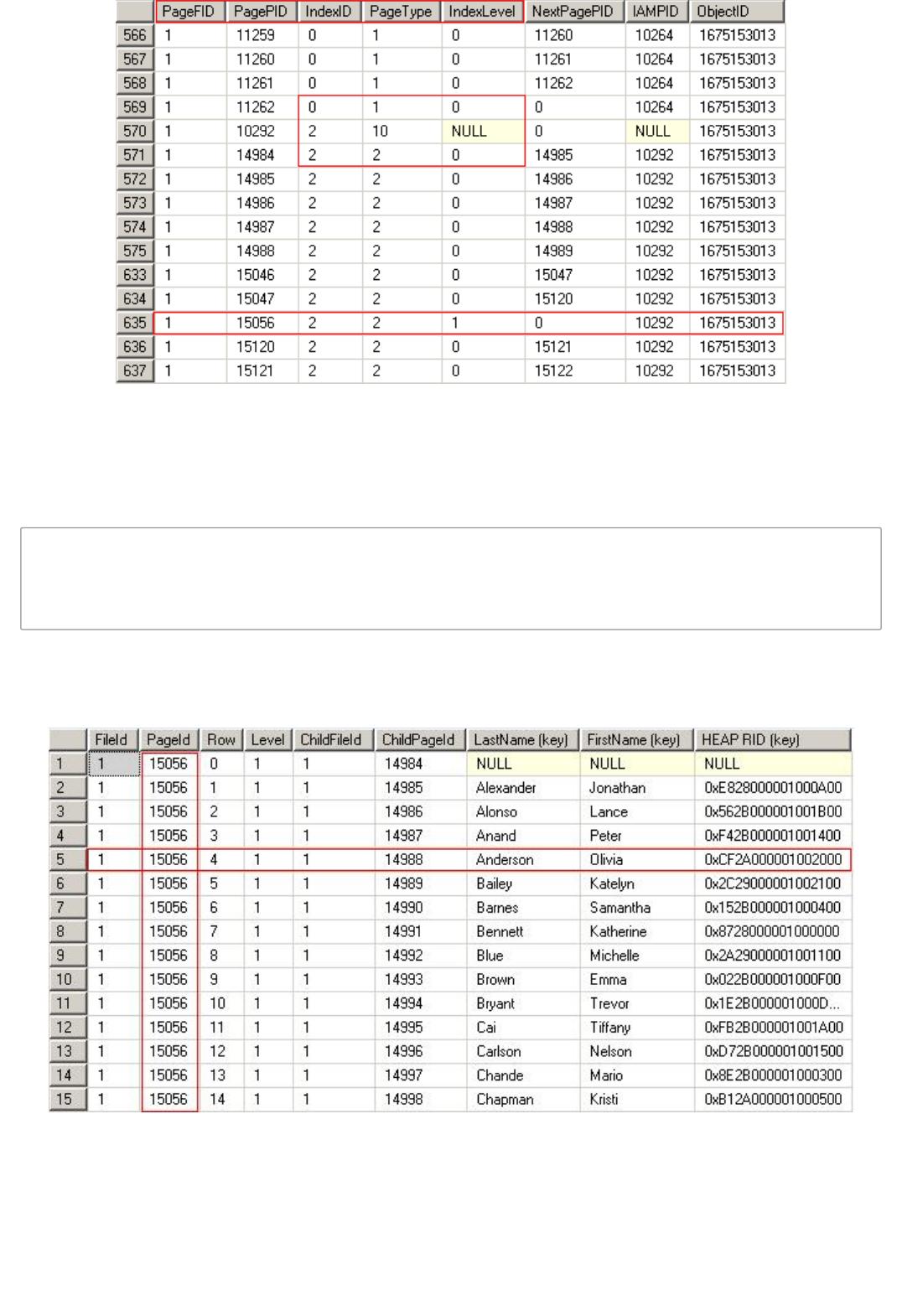
列PageFID和PagePID分别代表页所在的文件数目和数据在文件内的页数目。IndexID是在sys.indexes之中找
到的索引的index_id。PageType表示页的类型,Type=1是数据页,Type=2是索引页,Type=10是保存页本
身的IAM页。IndexLevel是按页数时IAM结构的级别。如果 level=0,那么就是索引的叶级别页。
1 DBCC TRACEON(3604)
2 DBCC PAGE(AdventureWorks,1,15056,3) WITH TABLERESULTS
3 DBCC PAGE(AdventureWorks,1,14988,3) WITH TABLERESULTS
以下分别是中间级索引页15056和叶级索引页14988、14989的数据分布情况。索引条目按照索引键的值有序排
列
of 4
免费下载
【版权声明】本文为墨天轮用户原创内容,转载时必须标注文档的来源(墨天轮),文档链接,文档作者等基本信息,否则作者和墨天轮有权追究责任。如果您发现墨天轮中有涉嫌抄袭或者侵权的内容,欢迎发送邮件至:contact@modb.pro进行举报,并提供相关证据,一经查实,墨天轮将立刻删除相关内容。
下载排行榜

评论