



4条回答
默认
最新
~ 匹配正则表达式,大小写相关 'thomas' ~ '.*thomas.*'
~* 匹配正则表达式,大小写无关 'thomas' ~* '.*Thomas.*'
!~ 不匹配正则表达式,大小写相关 'thomas' !~ '.*Thomas.*'
!~* 不匹配正则表达式,大小写无关 'thomas' !~* '.*vadim.*'
 评论
评论 有用 0
有用 0
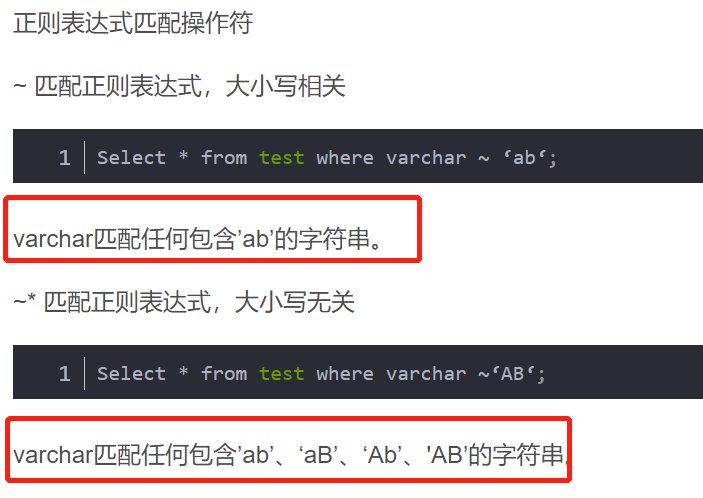
和 LIKE 一样,模式字符准确地匹配字串字符, 除非在正则表达式语言里有特殊字符 — 不过正则表达式用的 特殊字符和 LIKE 用的不同。
和 LIKE 不一样的是,正则表达式 可以匹配字串里的任何位置,除非该正则表达式明确地挂接在字串 的开头或者结尾。
评论 有用 1在postgresql中使用正则表达式时需要使用关键字“~”,以表示该关键字之前的内容需匹配之后的正则表达式,若匹配规则不需要区分大小写,可以使用组合关键字“~*”;
相反,若需要查询不匹配这则表达式的记录,只需在该关键字前加否定关键字“!”即可。若正则表达式包含转义字符,则需在表达式前加关键字“E”。
例如:
select * from user where email ~ '^[A-H]' --匹配email地址以A-H开头的记录
select * from user where email ~* '^[a-h]' --匹配email地址以A-H和a-h开头的记录
给你做个实验方便你理解:
postgres=# create table t1 (name varchar);
CREATE TABLE
postgres=# insert into t1 values ('A');
INSERT 0 1
postgres=# INSERT INTO T1 VALUES('a');
INSERT 0 1
postgres=# insert into t1 values('all');
INSERT 0 1
postgres=# insert into t1 values('LLa');
INSERT 0 1
-- 表里的内容:
postgres=# select * from t1;
 name
------
 A
 a
 all
 LLa
(4 行记录)
~‘a’: 区别大小写,包含‘a’的记录,就相当于like
postgres=# select name from t1 where name ~'a';
 name
------
 a
 all
 LLa
(3 行记录)
postgres=# select name from t1 where name ~'A';
 name
------
 A
(1 行记录)
~* 不区分大写小
postgres=# select name from t1 where name ~*'A';
 name
------
 A
 a
 all
 LLa
(4 行记录)
希望对你的理解有所帮助,如有帮助请采纳
评论 有用 2回答交流
提交
问题信息
请登录之后查看
邀请回答
暂无人订阅该标签,敬请期待~~
 墨值悬赏
墨值悬赏