


RMAN> duplicate target database for standby from active database nofilenamecheck;
Starting Duplicate Db at 06-APR-20
using target database control file instead of recovery catalog
allocated channel: ORA_AUX_DISK_1
channel ORA_AUX_DISK_1: SID=355 device type=DISK
contents of Memory Script:
{
backup as copy reuse
targetfile ‘+DATA/GKPTTJ/PASSWORD/pwdgkpttj.276.1036110745’ auxiliary format
‘/u01/app/oracle/product/12.1.0/dbhome_1/dbs/orapwdg’ ;
}
executing Memory Script
Starting backup at 06-APR-20
allocated channel: ORA_DISK_1
channel ORA_DISK_1: SID=377 instance=gkpttj1 device type=DISK
Finished backup at 06-APR-20
contents of Memory Script:
{
sql clone “create spfile from memory”;
shutdown clone immediate;
startup clone nomount;
restore clone from service ‘gkpttj’ standby controlfile;
}
executing Memory Script
sql statement: create spfile from memory
Oracle instance shut down
connected to auxiliary database (not started)
Oracle instance started
Total System Global Area 1593835520 bytes
Fixed Size 2924880 bytes
Variable Size 1006636720 bytes
Database Buffers 570425344 bytes
Redo Buffers 13848576 bytes
Starting restore at 06-APR-20
allocated channel: ORA_AUX_DISK_1
channel ORA_AUX_DISK_1: SID=243 device type=DISK
channel ORA_AUX_DISK_1: starting datafile backup set restore
channel ORA_AUX_DISK_1: using network backup set from service gkpttj
channel ORA_AUX_DISK_1: restoring control file
channel ORA_AUX_DISK_1: restore complete, elapsed time: 00:00:04
output file name=/u01/app/oracle/oradata/DG/controlfile/o1_mf_h8op3nqs_.ctl
Finished restore at 06-APR-20
contents of Memory Script:
{
sql clone ‘alter database mount standby database’;
}
executing Memory Script
sql statement: alter database mount standby database
RMAN-05529: WARNING: DB_FILE_NAME_CONVERT resulted in invalid ASM names; names changed to disk group only.
contents of Memory Script:
{
set newname for tempfile 1 to
“/u01/app/oracle/oradata/dg/temp.284.1036110993”;
set newname for tempfile 2 to
“+DATA/GKPTTJ/FD9AC20F64D244D7E043B6A9E80A2F2F/DATAFILE/pdbseed_temp012020-03-27_12-37-21-am.dbf”;
set newname for tempfile 3 to
“+DATA”;
set newname for tempfile 4 to
“+DATA”;
set newname for tempfile 5 to
“+DATA”;
set newname for tempfile 6 to
“+DATA”;
set newname for tempfile 7 to
“+DATA”;
switch clone tempfile all;
set newname for datafile 1 to
“/u01/app/oracle/oradata/dg/system.279.1036110869”;
set newname for datafile 3 to
“/u01/app/oracle/oradata/dg/sysaux.280.1036110825”;
set newname for datafile 4 to
“/u01/app/oracle/oradata/dg/undotbs1.277.1036110915”;
set newname for datafile 5 to
“+DATA”;
set newname for datafile 6 to
“/u01/app/oracle/oradata/dg/users.278.1036110915”;
set newname for datafile 7 to
“+DATA”;
set newname for datafile 8 to
“/u01/app/oracle/oradata/dg/undotbs2.288.1036111531”;
set newname for datafile 9 to
“+DATA”;
set newname for datafile 10 to
“+DATA”;
set newname for datafile 11 to
“+DATA”;
set newname for datafile 12 to
“+DATA”;
set newname for datafile 13 to
“+DATA”;
set newname for datafile 14 to
“+DATA”;
set newname for datafile 15 to
“+DATA”;
set newname for datafile 16 to
“+DATA”;
set newname for datafile 17 to
“+DATA”;
set newname for datafile 18 to
“+DATA”;
set newname for datafile 19 to
“+DATA”;
set newname for datafile 20 to
“+DATA”;
set newname for datafile 21 to
“+DATA”;
set newname for datafile 22 to
“+DATA”;
set newname for datafile 23 to
“+DATA”;
restore
from service ‘gkpttj’ clone database
;
sql ‘alter system archive log current’;
}
executing Memory Script
executing command: SET NEWNAME
executing command: SET NEWNAME
executing command: SET NEWNAME
executing command: SET NEWNAME
executing command: SET NEWNAME
executing command: SET NEWNAME
executing command: SET NEWNAME
renamed tempfile 1 to /u01/app/oracle/oradata/dg/temp.284.1036110993 in control file
renamed tempfile 2 to +DATA/GKPTTJ/FD9AC20F64D244D7E043B6A9E80A2F2F/DATAFILE/pdbseed_temp012020-03-27_12-37-21-am.dbf in control file
renamed tempfile 3 to +DATA in control file
renamed tempfile 4 to +DATA in control file
renamed tempfile 5 to +DATA in control file
renamed tempfile 6 to +DATA in control file
renamed tempfile 7 to +DATA in control file
executing command: SET NEWNAME
executing command: SET NEWNAME
executing command: SET NEWNAME
executing command: SET NEWNAME
executing command: SET NEWNAME
executing command: SET NEWNAME
executing command: SET NEWNAME
executing command: SET NEWNAME
executing command: SET NEWNAME
executing command: SET NEWNAME
executing command: SET NEWNAME
executing command: SET NEWNAME
executing command: SET NEWNAME
executing command: SET NEWNAME
executing command: SET NEWNAME
executing command: SET NEWNAME
executing command: SET NEWNAME
executing command: SET NEWNAME
executing command: SET NEWNAME
executing command: SET NEWNAME
executing command: SET NEWNAME
executing command: SET NEWNAME
Starting restore at 06-APR-20
using channel ORA_AUX_DISK_1
channel ORA_AUX_DISK_1: starting datafile backup set restore
channel ORA_AUX_DISK_1: using network backup set from service gkpttj
channel ORA_AUX_DISK_1: specifying datafile(s) to restore from backup set
channel ORA_AUX_DISK_1: restoring datafile 00001 to /u01/app/oracle/oradata/dg/system.279.1036110869
channel ORA_AUX_DISK_1: restore complete, elapsed time: 00:00:36
channel ORA_AUX_DISK_1: starting datafile backup set restore
channel ORA_AUX_DISK_1: using network backup set from service gkpttj
channel ORA_AUX_DISK_1: specifying datafile(s) to restore from backup set
channel ORA_AUX_DISK_1: restoring datafile 00003 to /u01/app/oracle/oradata/dg/sysaux.280.1036110825
channel ORA_AUX_DISK_1: restore complete, elapsed time: 00:00:26
channel ORA_AUX_DISK_1: starting datafile backup set restore
channel ORA_AUX_DISK_1: using network backup set from service gkpttj
channel ORA_AUX_DISK_1: specifying datafile(s) to restore from backup set
channel ORA_AUX_DISK_1: restoring datafile 00004 to /u01/app/oracle/oradata/dg/undotbs1.277.1036110915
channel ORA_AUX_DISK_1: restore complete, elapsed time: 00:00:08
channel ORA_AUX_DISK_1: starting datafile backup set restore
channel ORA_AUX_DISK_1: using network backup set from service gkpttj
channel ORA_AUX_DISK_1: specifying datafile(s) to restore from backup set
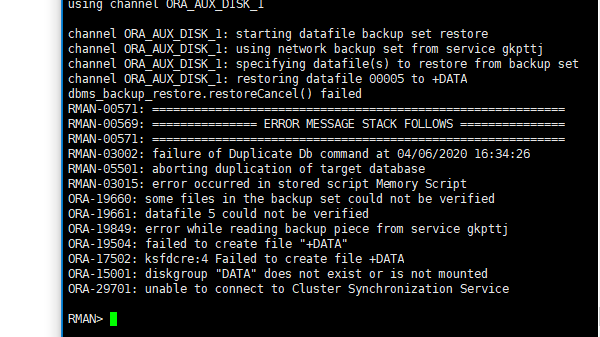
channel ORA_AUX_DISK_1: restoring datafile 00005 to +DATA
dbms_backup_restore.restoreCancel() failed
RMAN-00571: ===========================================================
RMAN-00569: =============== ERROR MESSAGE STACK FOLLOWS ===============
RMAN-00571: ===========================================================
RMAN-03002: failure of Duplicate Db command at 04/06/2020 15:24:07
RMAN-05501: aborting duplication of target database
RMAN-03015: error occurred in stored script Memory Script
ORA-19660: some files in the backup set could not be verified
ORA-19661: datafile 5 could not be verified
ORA-19849: error while reading backup piece from service gkpttj
ORA-19504: failed to create file “+DATA”
ORA-17502: ksfdcre:4 Failed to create file +DATA
ORA-15001: diskgroup “DATA” does not exist or is not mounted
ORA-29701: unable to connect to Cluster Synchronization Service
RMAN>
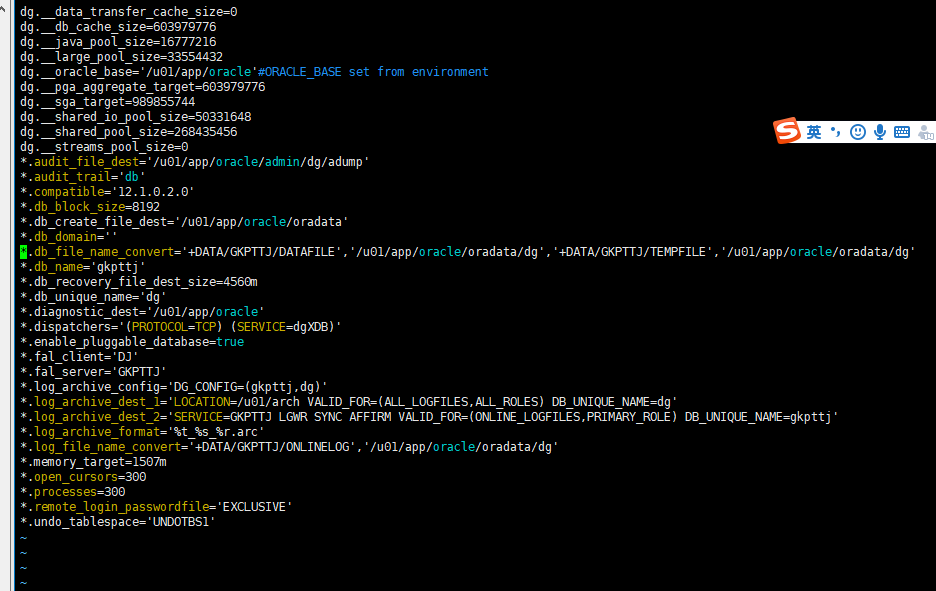
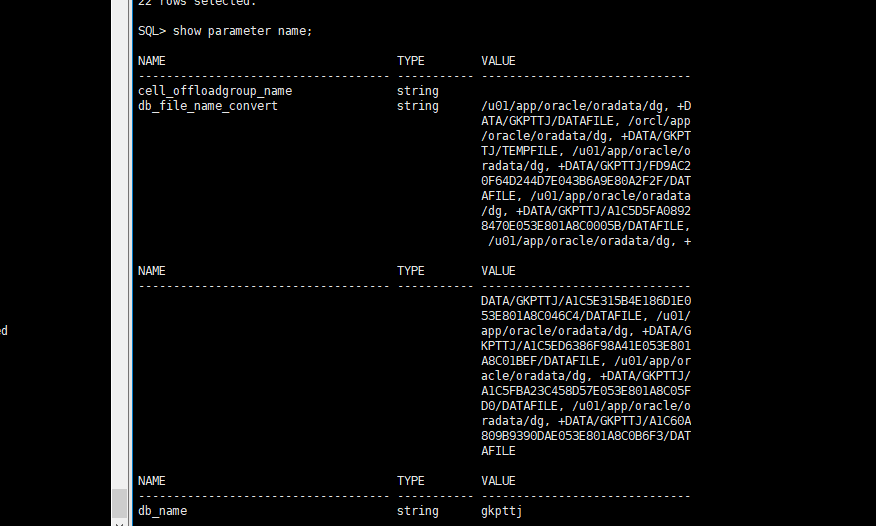
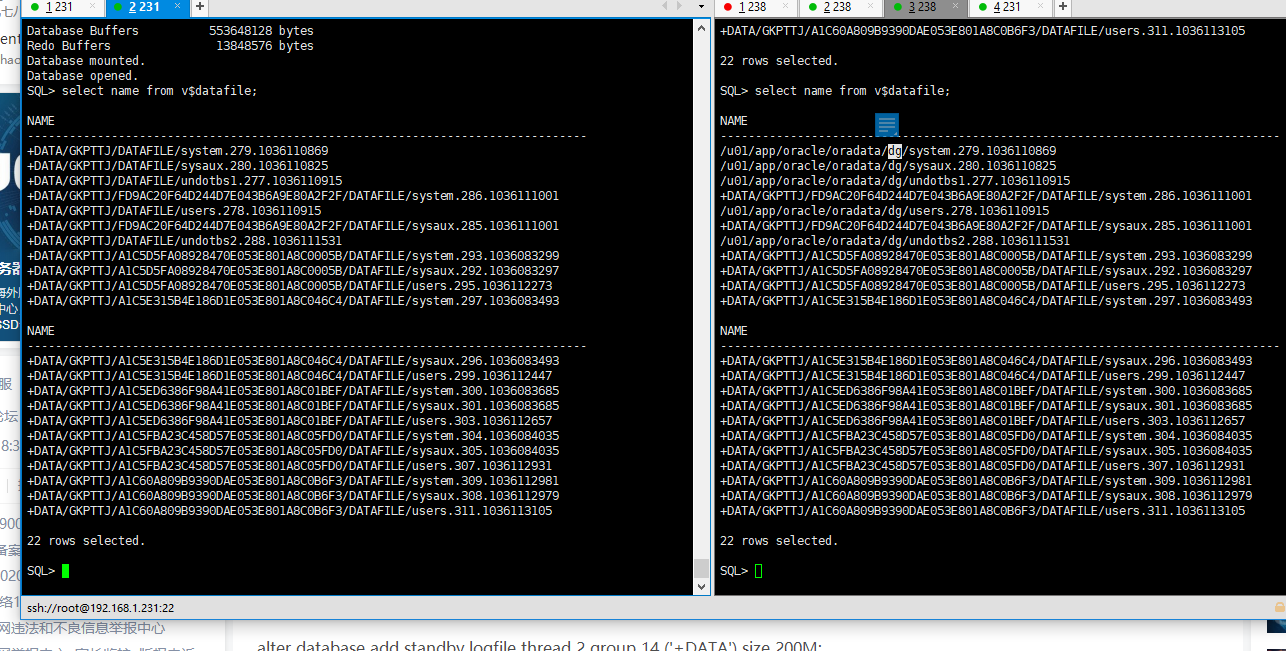
已经尝试很多次了还是不行,备库的参数文件
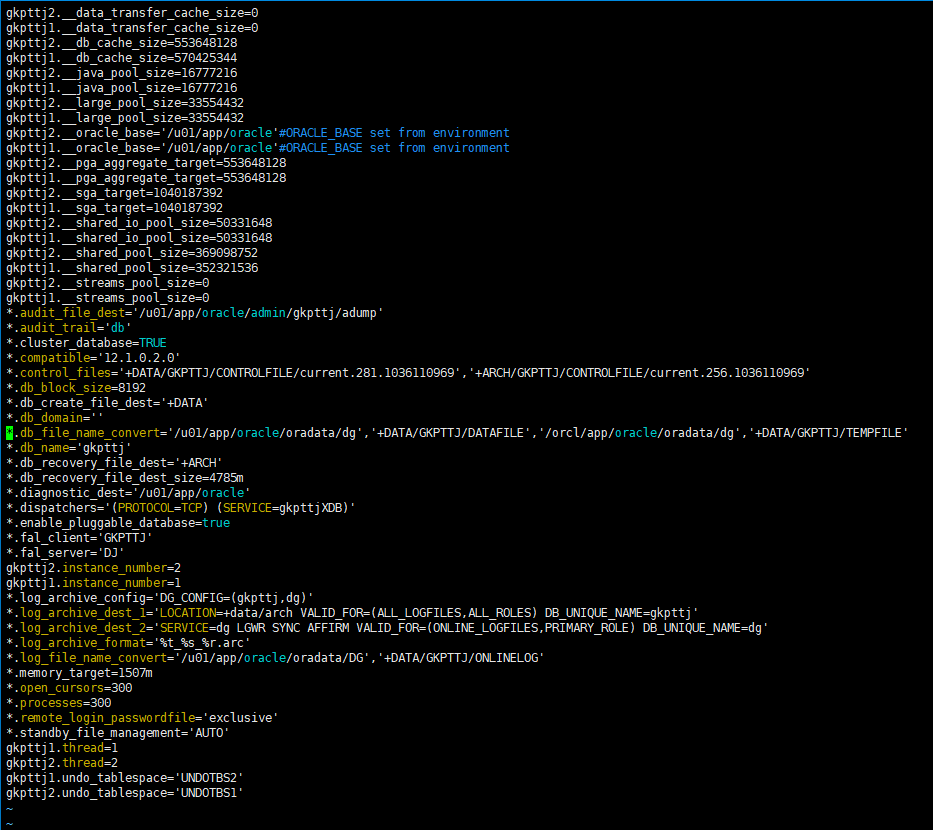
主库的参数文件,
希望大神帮我看看,到底是哪里错了
 评论
评论

 墨值悬赏
墨值悬赏